Real-Time SQL on Kafka with PySpark
Run real-time SQL queries on Kafka with PySpark. Stream processing tutorial with JSON transformations, ChatGPT integration, and data generation.

PySpark is a Python interface for Apache Spark. Spark crunches big datasets in a distributed way, and PySpark lets you control it from a Python shell.
Combining PySpark with Kafka creates a system that processes real-time data in seconds. You can run ad-hoc SQL analysis locally without deploying anything.
This guide covers:
- Setting up PySpark with Kafka
- Filtering and transforming JSON using SQL
- Using Conduktor as a faster alternative for simple filters
- Generating test data with ChatGPT
Installing PySpark
On macOS, install via Homebrew. See Apache Spark docs for other systems.
$ brew install apache-sparkThis installs the full Spark stack. Spark runs on the JVM with Scala at its core. We only need the pyspark CLI.
Open a new terminal and run:
$ pyspark
Python 3.11.5 (main, Aug 24 2023, 15:09:45) [Clang 14.0.3 (clang-1403.0.22.14.1)] on darwin
Type "help", "copyright", "credits" or "license" for more information.
Setting default log level to "WARN".
To adjust logging level use sc.setLogLevel(newLevel). For SparkR, use setLogLevel(newLevel).
23/09/14 00:13:14 WARN NativeCodeLoader: Unable to load native-hadoop library for your platform... using builtin-java classes where applicable
Welcome to
      ____              __
     / __/__  ___ _____/ /__
    _\ \/ _ \/ _ `/ __/  '_/
   /__ / .__/\_,_/_/ /_/\_\   version 3.4.1
      /_/

Using Python version 3.11.5 (main, Aug 24 2023 15:09:45)
Spark context Web UI available at http://stephane.lan:4040
Spark context available as 'sc' (master = local[*], app id = local-1694643195574).
SparkSession available as 'spark'.
>>>
A local Spark instance is now running with a web UI at http://localhost:4040.
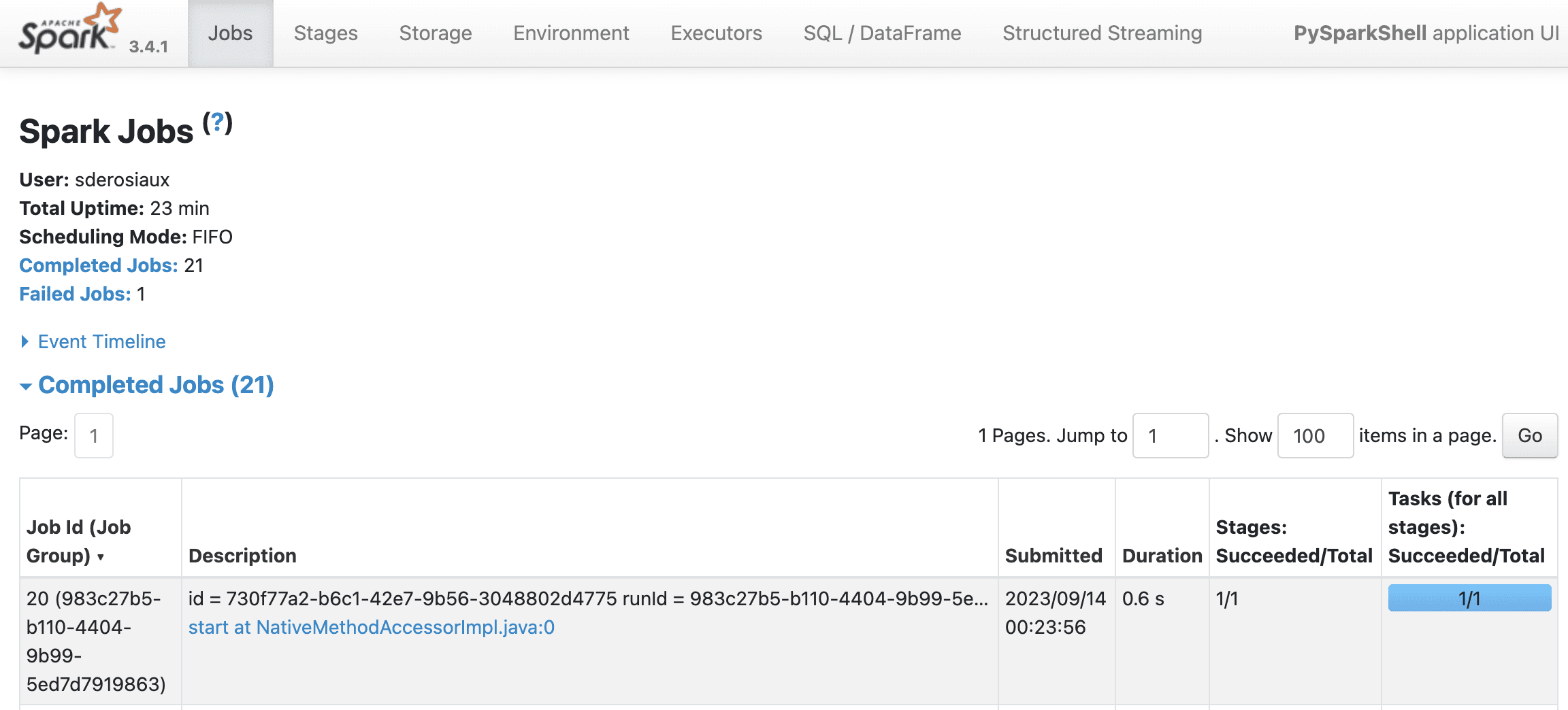
Test the API with a basic dataset:
>>> data = [("Java", "20000"), ("Python", "100000"), ("Scala", "3000")]
>>> df = spark.createDataFrame(data)
df.show()
>>> df.show()
+------+------+
| _1| _2|
+------+------+
| Java| 20000|
|Python|100000|
| Scala| 3000|
+------+------+
>>> df.printSchema()
root
 |-- _1: string (nullable = true)
 |-- _2: string (nullable = true)
A DataFrame (
df) is a table with rows and columns. Each column has a name, each row is a record. Think spreadsheet, but designed for millions or billions of rows, including data that won't fit in memory.
DataFrames support sorting, filtering, and calculations like spreadsheets. The difference: they scale to massive datasets across distributed clusters.
Kafka produces massive streams of data. Spark processes massive datasets. They fit together naturally.
Connecting PySpark to Kafka
First, you need a Kafka cluster. Upstash offers a free tier. We'll use Conduktor to create topics and produce data, and PySpark for transformations.
Follow Getting Started with Conduktor and Upstash for setup.
If you don't have Conduktor installed:
$ curl -L https://releases.conduktor.io/console -o docker-compose.yml && docker compose up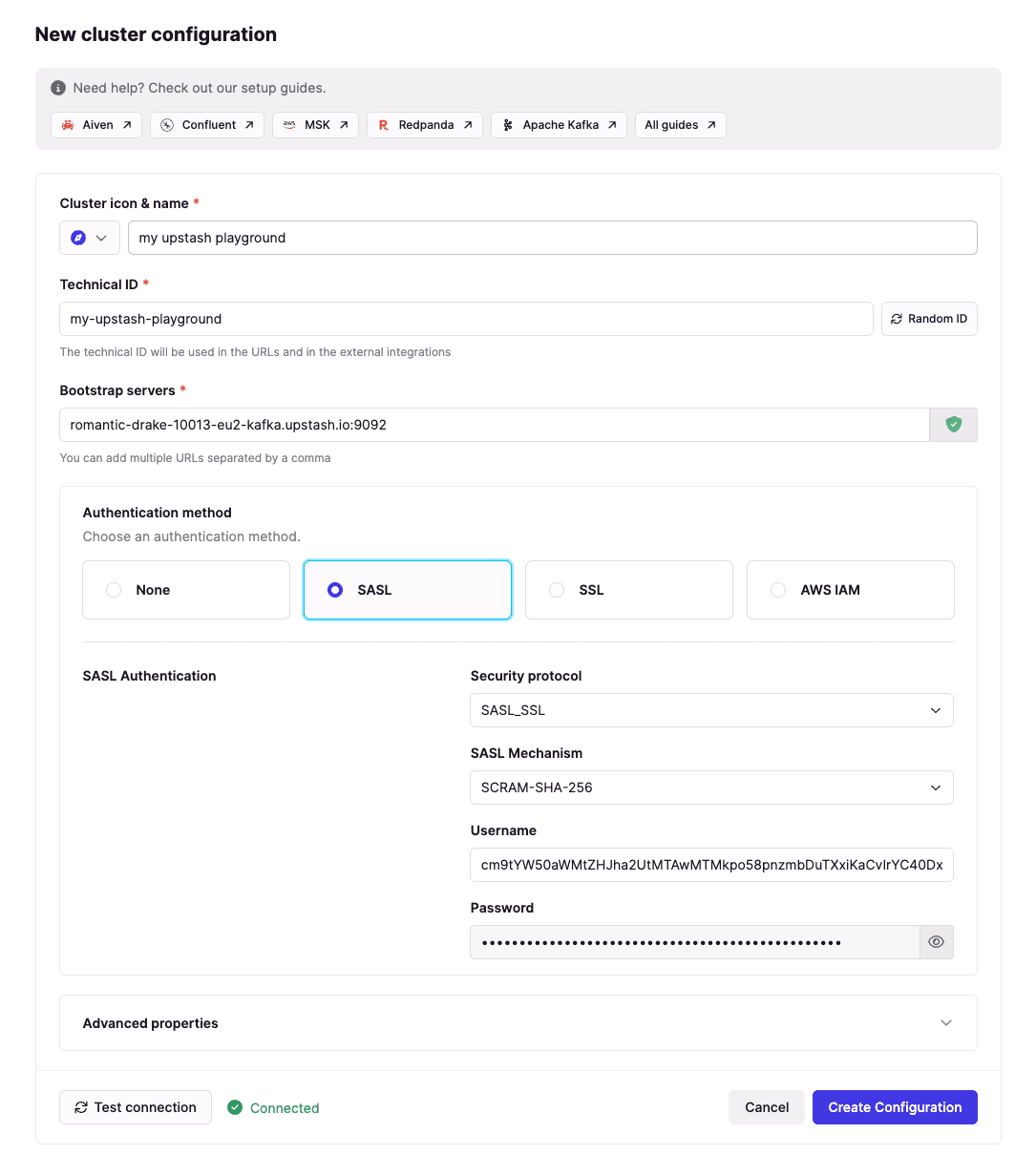
Create a topic called "hello" and produce some data:
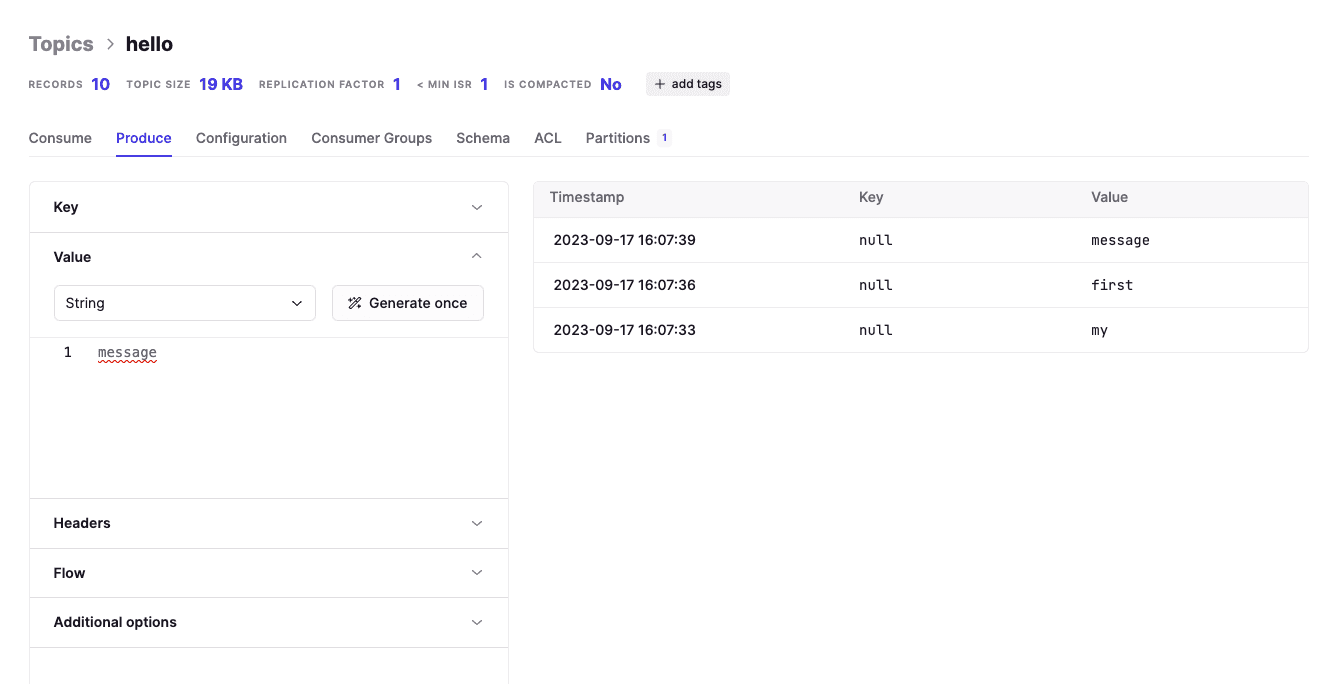
Start PySpark with the Kafka dependency:
# Without spark-sql-kafka, you'll get:
# pyspark.errors.exceptions.captured.AnalysisException: Failed to find data source: kafka.

$ pyspark --packages org.apache.spark:spark-sql-kafka-0-10_2.12:3.4.1
Replace XXX and YYY with your Upstash credentials in the code below:
The
"startingOffsets": "earliest"option tells Spark to read from the beginning of the topic, not the end (the default).
from pyspark.sql import SparkSession
from datetime import datetime, timedelta
import time

# Consumer runs for 10 seconds
stop_time = datetime.now() + timedelta(seconds=10)

##
## TODO: UPDATE kafka.sasl.jaas.config
##
kafka_options = {
 "kafka.bootstrap.servers": "romantic-drake-10214-eu1-kafka.upstash.io:9092",
 "kafka.sasl.mechanism": "SCRAM-SHA-256",
 "kafka.security.protocol": "SASL_SSL",
 "kafka.sasl.jaas.config": """org.apache.kafka.common.security.scram.ScramLoginModule required username="XXX" password="YYY";""",
 "startingOffsets": "earliest",
 "subscribe": "hello"
}

# Subscribe to Kafka topic "hello"
df = spark.readStream.format("kafka").options(** kafka_options).load()

# Deserialize the value from Kafka as a String
deserialized_df = df.selectExpr("CAST(value AS STRING)")

# Query Kafka for 10 seconds
query = deserialized_df.writeStream.outputMode("append").format("console").start()
time.sleep(10)
query.stop()
Output while producing data via Conduktor:
+---------------+
| value|
+---------------+
| my |
| first |
| message |
...
+---------------+
only showing top 20 rows
>>>
The connection works. Now for JSON transformations.
Monitoring Active Queries in the Spark UI
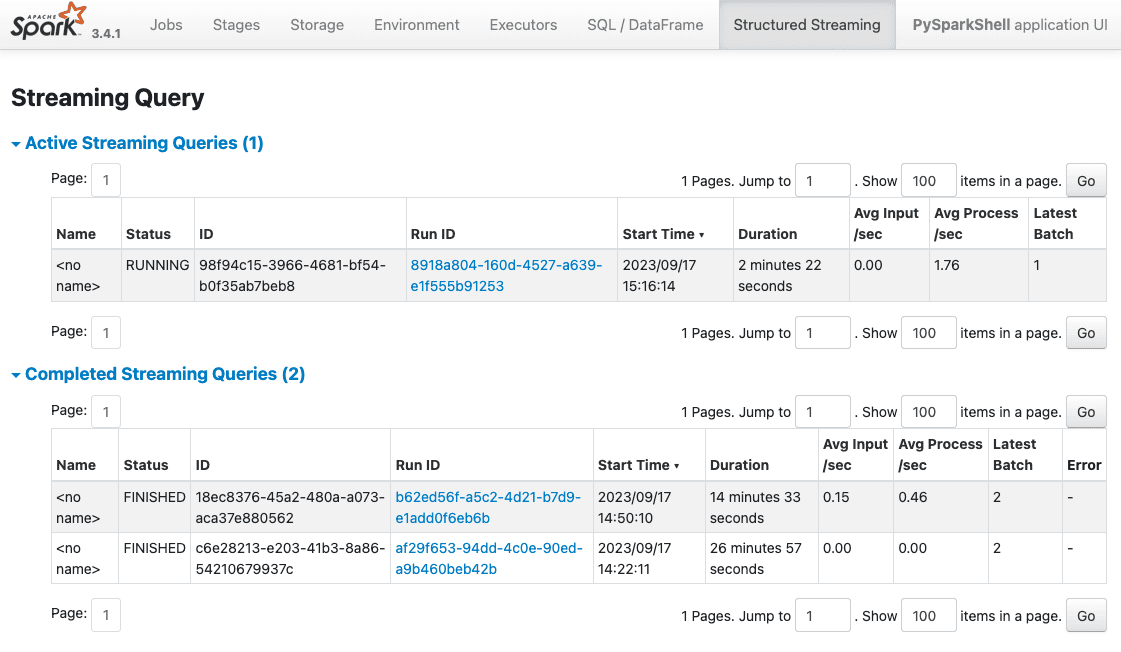
Shell work gets messy. You start streaming queries and forget to .stop() them. The Spark UI shows active queries and their status:
http://localhost:4040/StreamingQuery/:
Running SQL on JSON from Kafka
We'll work with Netflix-style "view events":
{
  "user_id": 18,
  "content": "Stranger Things",
  "watched_at": "2023-08-10 10:00:01",
  "rating": 5
}
Produce this JSON in the hello topic, then run:
from pyspark.sql.functions import *
from pyspark.sql.types import *

json_schema = StructType([
 StructField("user_id", StringType()),
 StructField("content", StringType()),
 StructField("watched_at", TimestampType()),
 StructField("rating", IntegerType()),
])

# df is the DataFrame reading from Kafka above
json_df = df.select(from_json(col("value").cast("string"), json_schema).alias("value"))
json_df.printSchema()
# root
# |-- value: struct (nullable = true)
# | |-- user_id: string (nullable = true)
# | |-- content: string (nullable = true)
# | |-- watched_at: timestamp (nullable = true)
# | |-- rating: integer (nullable = true)

query = json_df.writeStream.outputMode("append").format("console").start()
time.sleep(10)
query.stop()
Output:
+--------------------+
| value|
+--------------------+
|{18, Stranger Thi...|
+--------------------+
Now for SQL. Create a temporary view (required because SQL context doesn't know Python variable names):
# value.* avoids prefixing every field with "value."
json_df.select("value.*").createOrReplaceTempView("netflix_view")

averageRatings = spark.sql("SELECT content, AVG(rating) FROM netflix_view GROUP BY content")
query = averageRatings.writeStream.outputMode("complete").format("console").start()
# "complete" mode is required for GROUP BY aggregations
# "append" mode fails with: Append output mode not supported when there are streaming aggregations

time.sleep(10)
query.stop()
Produce more data:
{
  "user_id": 112,
  "content": "The Crown",
  "watched_at": "2023-08-11 10:00:01",
  "rating": 4
}
Spark displays the update:
+---------------+-----------+
| content|avg(rating)|
+---------------+-----------+
|Stranger Things| 3.75|
| The Crown| 4.0|
+---------------+-----------+
Real-time SQL on Kafka data, running in your terminal.
Filtering Without Spark Using Conduktor Console
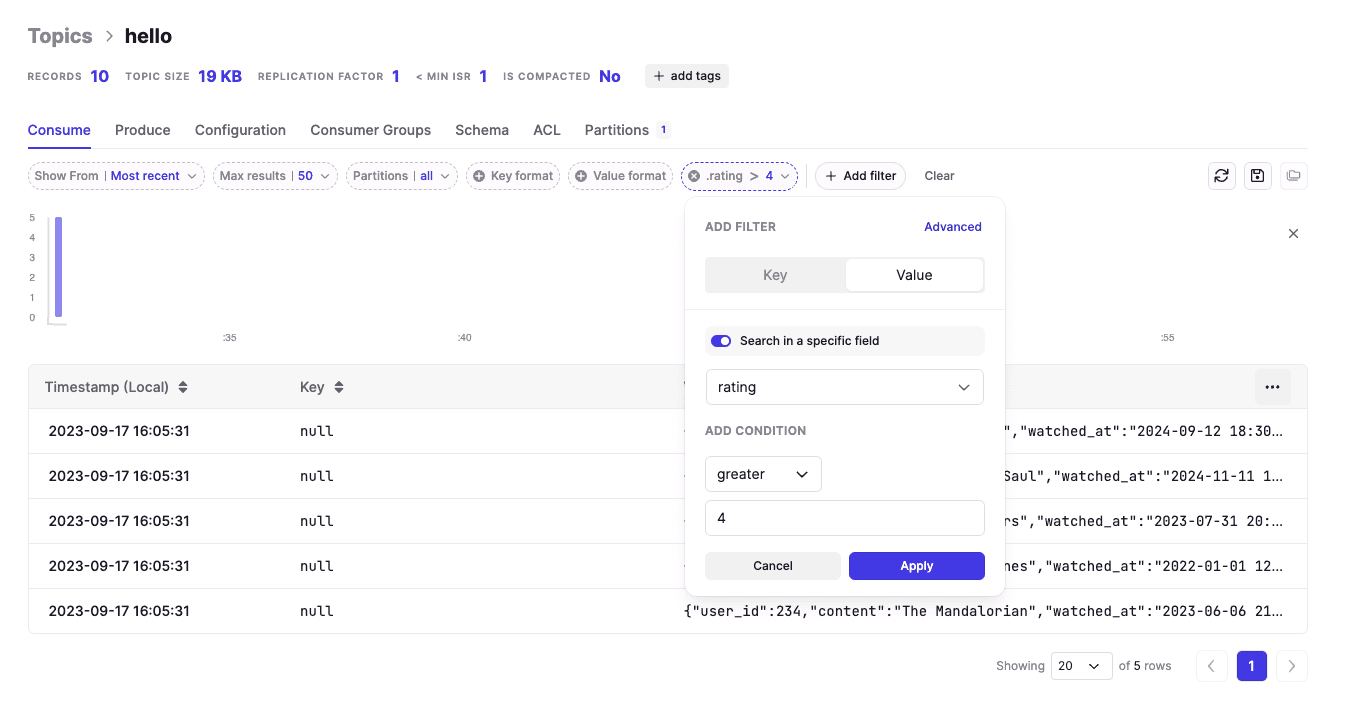
For simple field filtering (no GROUP BY), you don't need PySpark. Conduktor Console filters Kafka data directly.
Below: filtering messages where rating > 4. Add as many filters as needed.
Creating Virtual SQL Topics with Conduktor Gateway
Conduktor Gateway supports Virtual SQL Topics: persistent SQL views over Kafka topics. No code, no stream processing framework. Everything runs in memory at runtime, costing nothing.
With Gateway deployed, add the SQL Topic interceptor:
{
  "name": "my-virtual-sql-topic-interceptor",
  "pluginClass": "io.conduktor.gateway.interceptor.VirtualSqlTopicPlugin",
  "priority": 100,
  "config": {
    "virtualTopic": "good_ratings",
    "statement": "SELECT * FROM my_netflix_topic WHERE rating >= 4"
  }
}
Users now access a topic named good_ratings built from your SQL query. It's not materialized (no storage, no partitions) but behaves like a normal topic. Works with kafka-console-consumer, Spring, any Kafka client.
Common use case: hide the original
my_netflix_topicand expose only filtered data viagood_ratings. Hide sensitive data, expose only what's needed, and modify the SQL query without consumers knowing.
Generating Test Data with ChatGPT
This section is optional. It requires an OpenAI account and a Google Cloud account.
Setup:
- Create an API key on OpenAI
- Create a Search Engine on Google Cloud for a Search Engine ID
- Enable the Custom Search API on your Google Cloud project
Export these variables (quit PySpark with Ctrl+C, add exports, restart):
export OPENAI_API_KEY=sk-your-openai-api-key-here
export GOOGLE_API_KEY=your-google-api-key-here
export GOOGLE_CSE_ID=your-google-cse-id-here
We'll use pyspark-ai for OpenAI integration.
With GPT-4 access:
from pyspark_ai import SparkAI
spark_ai = SparkAI()
spark_ai.activate()
Without GPT-4 (use GPT-3.5):
from pyspark_ai import SparkAI
from langchain.chat_models import ChatOpenAI
llm = ChatOpenAI(model_name='gpt-3.5-turbo')
spark_ai = SparkAI(llm=llm, verbose=True)
spark_ai.activate()
Available models: https://platform.openai.com/account/rate-limits
After activation, create a DataFrame from Wikipedia:
df = spark_ai.create_df("https://en.wikipedia.org/wiki/List_of_most-subscribed_YouTube_channels", [ "name", "subscribers", "language", "category", "country" ])
df.show()
Output:
[..]
+--------------------+-----------+--------+-------------+--------------------+
| name|subscribers|language| category| country|
+--------------------+-----------+--------+-------------+--------------------+
| T-Series| 249.0| Hindi| Music| India|
| MrBeast| 183.0| English|Entertainment| United States|
| Cocomelon| 165.0| English| Education| United States|
|Sony Entertainmen...| 162.0| Hindi|Entertainment| India|
| Kids Diana Show| 113.0| English|Entertainment|Ukraine- United S...|
| PewDiePie| 111.0| English|Entertainment| Sweden|
| Like Nastya| 107.0| English|Entertainment|Russia- United St...|
| Vlad and Niki| 101.0| English|Entertainment|Russia- United St...|
| Zee Music Company| 99.5| Hindi| Music| India|
| WWE| 97.1| English| Sports| United States|
| Blackpink| 91.2| Korean| Music| South Korea|
| Goldmines| 89.5| Hindi| Film| India|
| Sony SAB| 85.2| Hindi|Entertainment| India|
| 5-Minute Crafts| 80.2| English| How-to| Cyprus|
| BangtanTV| 76.4| Korean| Music| South Korea|
| Hybe Labels| 72.6| Korean| Music| South Korea|
| Zee TV| 72.4| Hindi|Entertainment| India|
| Justin Bieber| 71.9| English| Music| Canada|
| Pinkfong| 69.5| English| Education| South Korea|
|ChuChu TV Nursery...| 67.5| Hindi| Education| India|
+--------------------+-----------+--------+-------------+--------------------+
[..]
Natural language queries work:
>>> df.ai.verify("expect France not to be in the countries")
Result: True
>>> df.ai.transform("per country").show()
+--------------------+-----------------+
| country|total_subscribers|
+--------------------+-----------------+
| India| 1312.2|
| United States| 678.5|
|Ukraine- United S...| 113.0|
| Sweden| 111.0|
|Russia- United St...| 208.0|
| South Korea| 309.7|
| Cyprus| 80.2|
| Canada| 71.9|
| Brazil| 66.6|
| Argentina| 59.7|
+--------------------+-----------------+It builds PySpark programs (typically SQL) behind the scenes.
GPT-3.5 may fail on large datasets:
openai.error.InvalidRequestError: This model's maximum context length is 4097 tokens. However, your messages resulted in 7337 tokens.
Plotting works too:
>>> df.ai.plot("by country")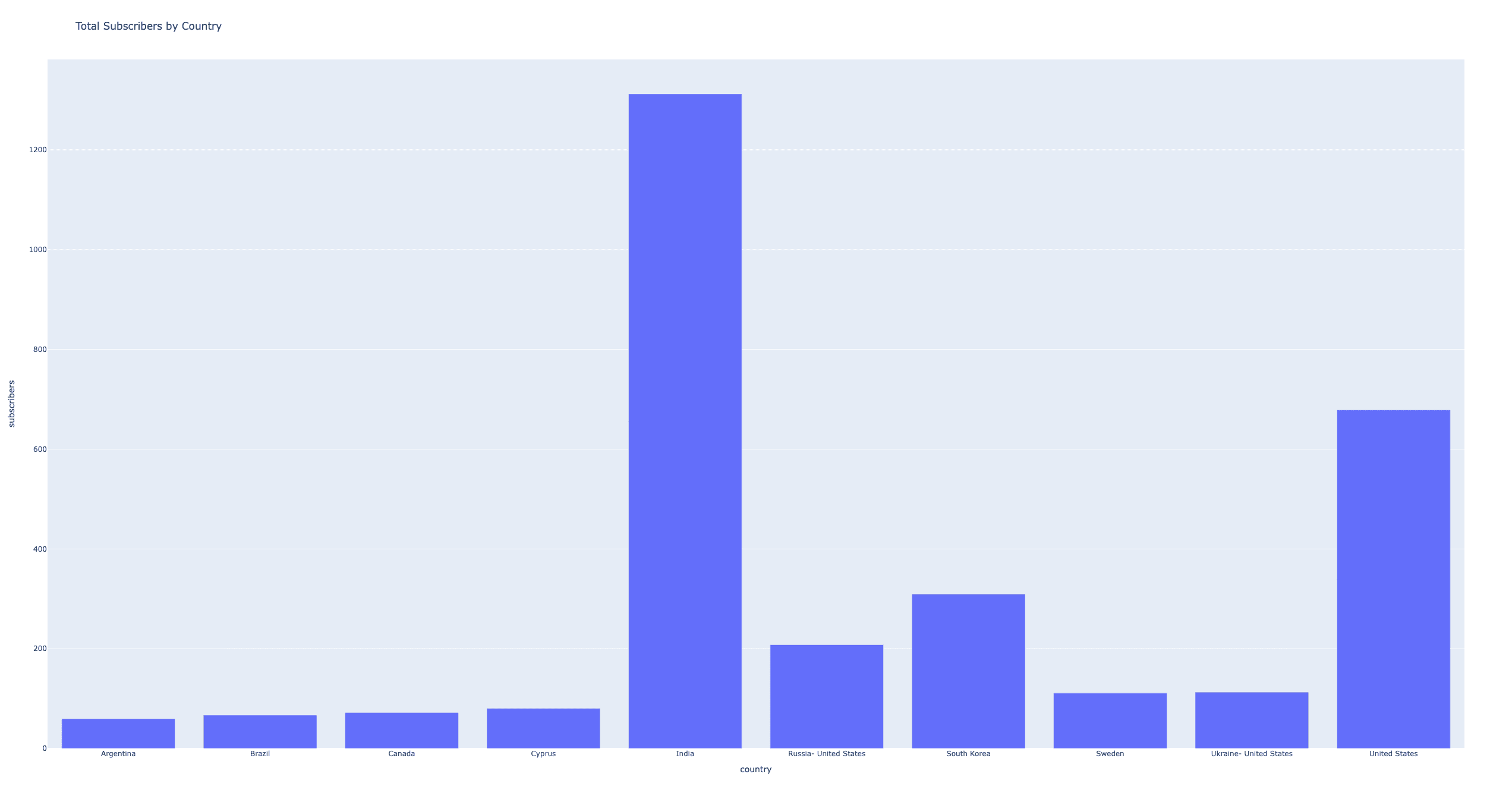
Producing AI-Generated JSON to Kafka
Use ChatOpenAI directly to generate test payloads:
from langchain.chat_models import ChatOpenAI
from langchain.schema import *
llm = ChatOpenAI(model_name='gpt-4') # or gpt-3.5
random_json = llm([HumanMessage(content="""generate random minified JSON payloads based on this: {
 "user_id": 112,
 "content": "The Crown",
 "watched_at": "2023-08-11 10:00:01",
 "rating": 4
}""")]).content

random_json
ChatGPT generates:
{"user_id":345,"content":"Breaking Bad","watched_at":"2022-12-14 18:30:12","rating":5}
{"user_id":876,"content":"Friends","watched_at":"2023-01-03 21:00:00","rating":4}
{"user_id":290,"content":"Stranger Things","watched_at":"2023-04-16 22:45:01","rating":5}
{"user_id":789,"content":"The Witcher","watched_at":"2023-08-14 20:55:00","rating":4}
{"user_id":654,"content":"Mandalorian","watched_at":"2023-07-20 19:10:10","rating":5}
{"user_id":321,"content":"Peaky Blinders","watched_at":"2023-09-10 22:00:45","rating":4}
{"user_id":154,"content":"Game of Thrones","watched_at":"2023-05-15 21:30:30","rating":3}
{"user_id":903,"content":"Money Heist","watched_at":"2023-10-01 23:00:01","rating":4}
{"user_id":567,"content":"Westworld","watched_at":"2023-06-12 20:10:10","rating":4}
{"user_id":238,"content":"Better Call Saul","watched_at":"2023-07-11 19:00:00","rating":5}
Send it to Kafka:
chatgpt_records = random_json.strip().split("\n")
chatgpt_df = spark.createDataFrame([Row(value=x) for x in chatgpt_records])
chatgpt_df.selectExpr("CAST(value AS STRING)").write.format("kafka").options(** kafka_options).option("topic", "hello").save()
Each generation updates the running averageRatings query:
# averageRatings = spark.sql("SELECT content, AVG(rating) FROM netflix_view GROUP BY content")

+---------------+-----------+
| content|avg(rating)|
+---------------+-----------+
| Westworld| 4.0|
| Money Heist| 4.0|
|Stranger Things| 4.0|
| The Crown| 4.0|
| Narcos| 5.0|
| The Office| 4.0|
| Peaky Blinders| 5.0|
| Breaking Bad| 5.0|
|The Mandalorian| 5.0|
| Friends| 3.0|
|Game of Thrones| 4.0|
+---------------+-----------+
The loop closes: AI generates JSON, writes to Kafka, PySpark runs SQL on it in real-time.
Summary
This guide covered:
- PySpark installation and Kafka integration
- SQL filtering and transformations on streaming JSON
- Conduktor Console for simple filtering without code
- Conduktor Gateway for virtual SQL topics
- ChatGPT for generating test data
PySpark handles ad-hoc analysis locally. Conduktor's UI and Gateway add SQL capabilities without deploying a stream processing framework. Together, they make real-time data exploration fast and cheap.