Schema Registry Prevents Data Chaos in Kafka. Here's How It Works.
Schema Registry prevents Kafka data chaos. Learn serialization, schema evolution, compatibility checks, and Aiven Karapace setup with Conduktor.

This article explains why Schema Registry is essential for Apache Kafka users.
We cover how Kafka transfers data using Zero Copy, why serialization matters, what Schema Registry does, and how to set one up with Aiven Karapace and Conduktor Console.
Kafka Transfers Bytes, Not Structured Data
Apache Kafka is a distributed event streaming platform composed of broker machines. Brokers accept events from producers and retain them based on time or message size, allowing consumers to read and process them asynchronously.
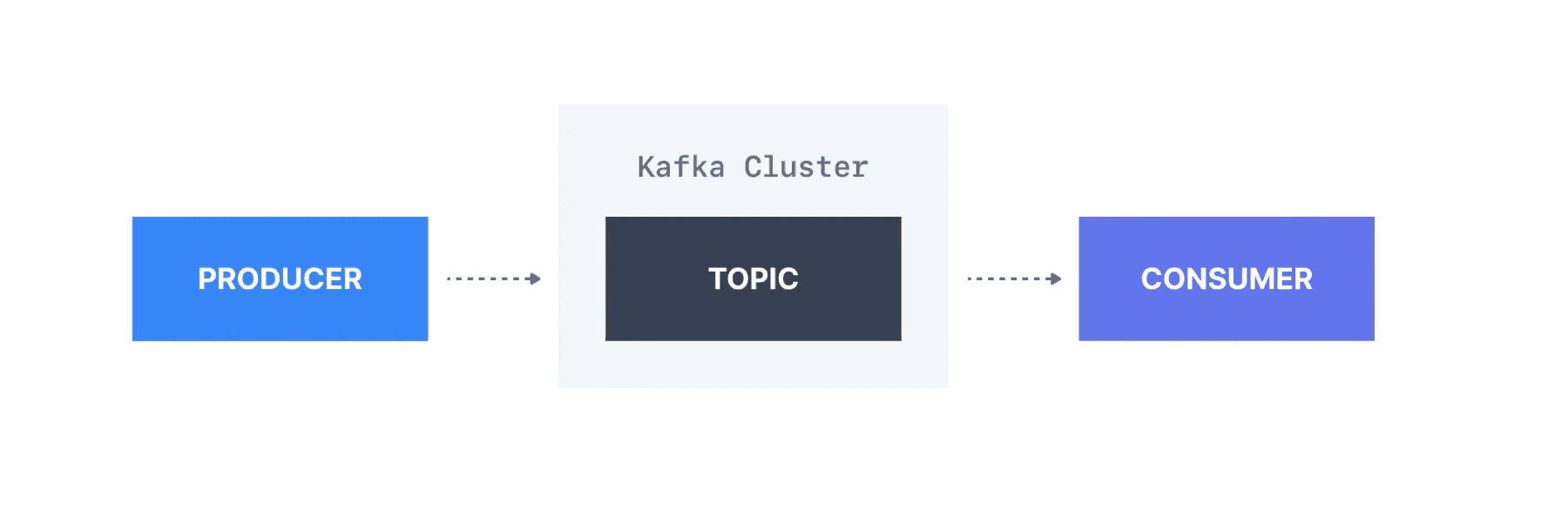 Figure 1: Example Kafka cluster setup with a producer, a topic, and a consumer (1)
Zero Copy Means Kafka Never Reads Your Data
Kafka operates on the "Zero Copy Principle." It transfers data in byte format without reading it.
This gives Kafka significant performance advantages over approaches that copy data between channels. But it also means Kafka performs no data verification. Kafka does not know what kind of data is sent or received.
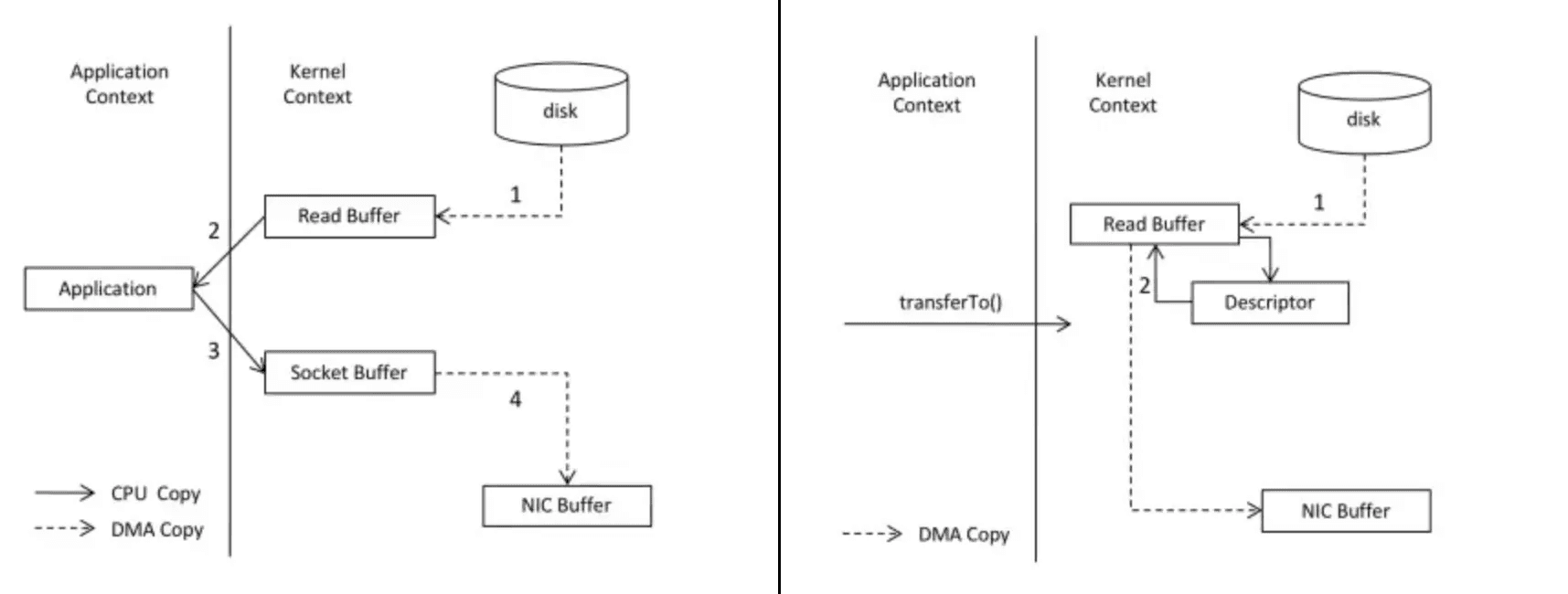
Comparing Zero Copy (On the left) to more traditional approaches (On the right)
Figure 2: Comparing Zero Copy (On the left) to more traditional approaches (On the right) (3)
Serialization Converts Objects to Bytes for Transfer
Producers and consumers do not communicate directly. Data moves through topics.
The producer serializes objects into byte streams for transmission. Kafka stores these bytes in the target topic(s). The consumer deserializes the byte arrays back into the desired data type: string, integer, Avro, etc.
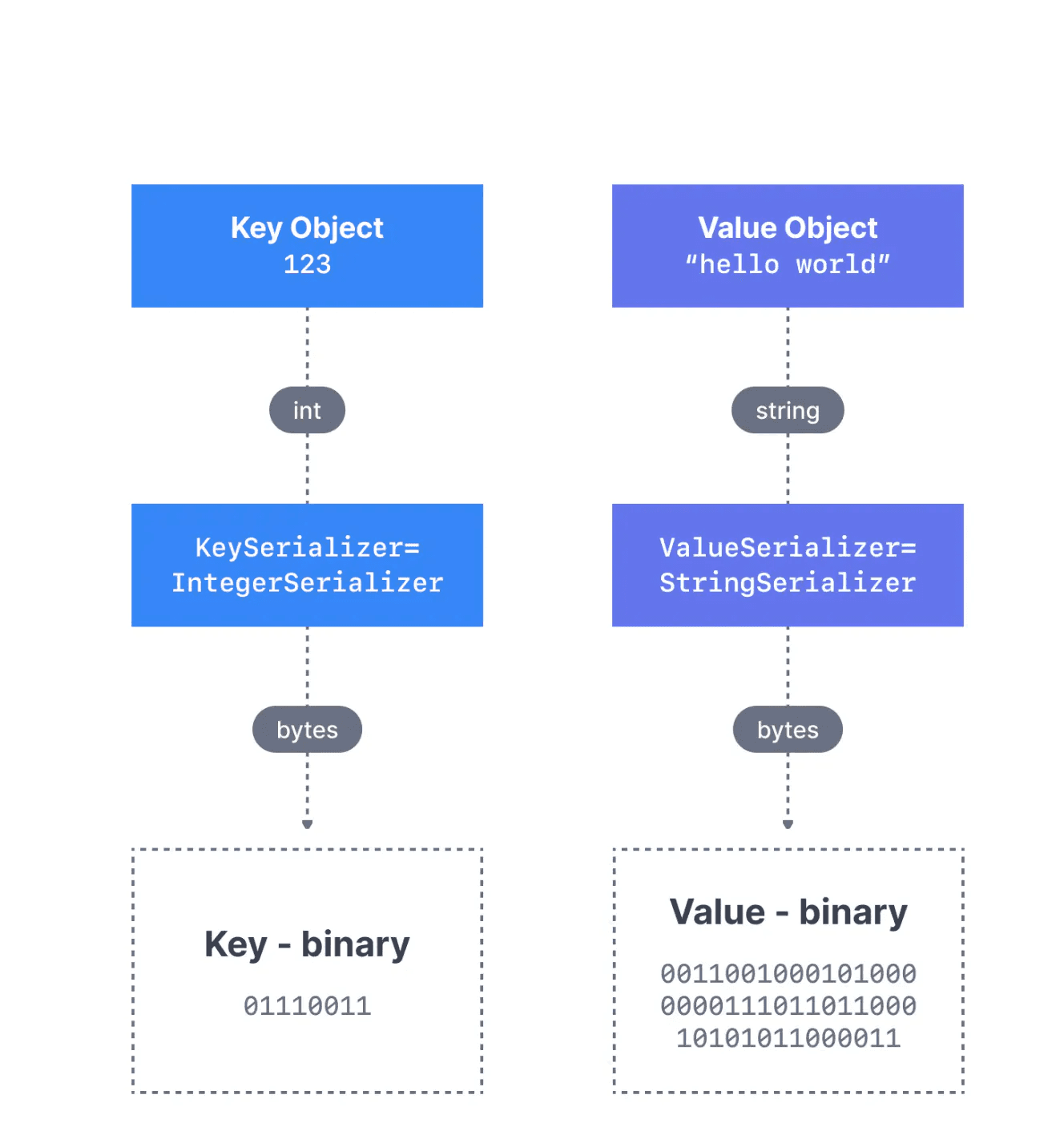
Kafka message serialization for a message with a Integer Key and a String Value
Figure 3: Kafka message serialization for a message with an Integer Key and a String Value (4)
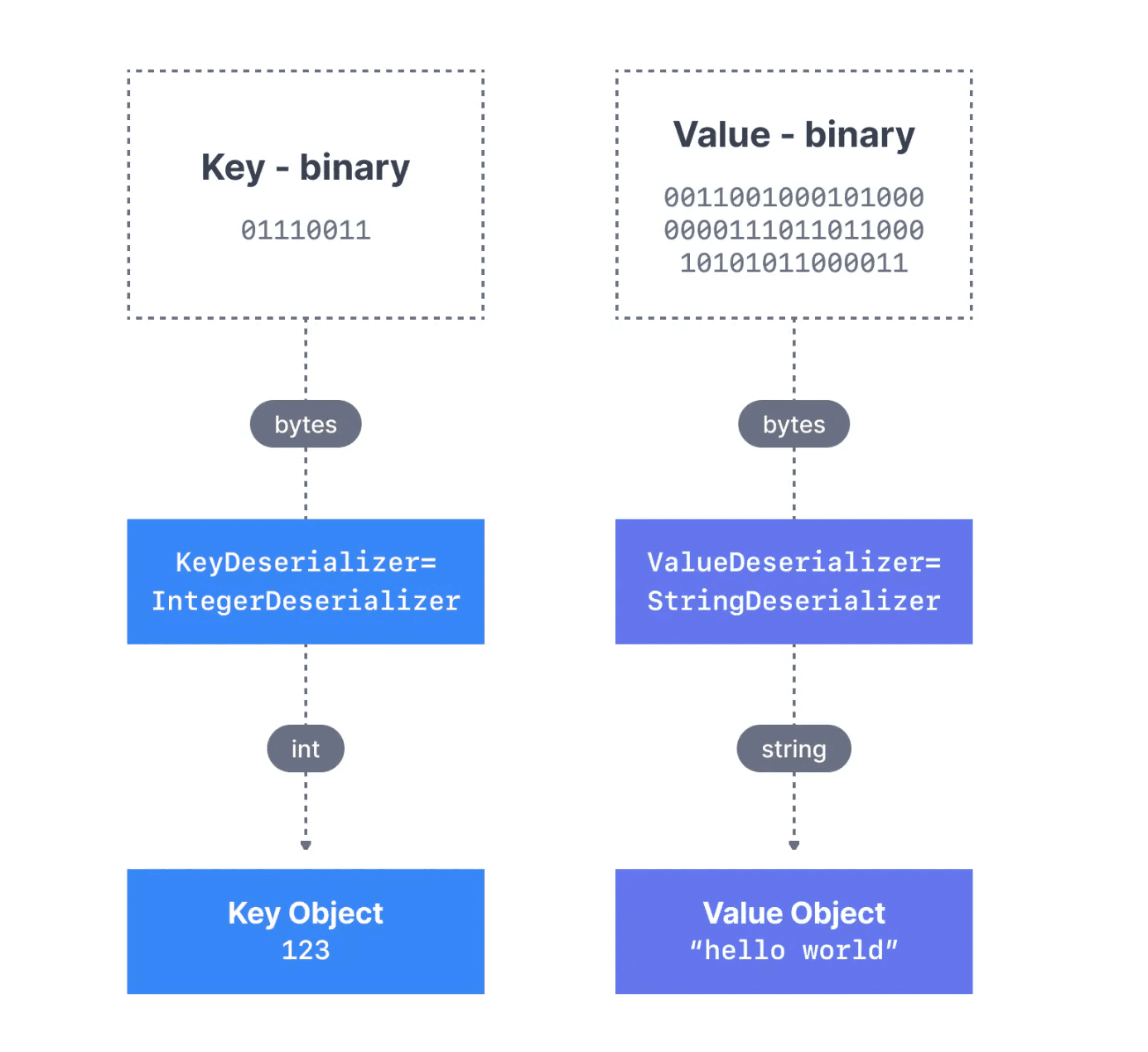
Kafka message deserialization for a message with a Integer Key and a String Value
Figure 4: Kafka message deserialization for a message with an Integer Key and a String Value (5)
What happens when a producer sends data the consumer cannot deserialize? This is called a "poison pill" [6]. The consumer breaks because it cannot read the messages. Applications fail.
The risk grows with the number of topics. More topics mean more opportunities for producer-consumer serialization mismatches.
Data Formats and Schemas Define Message Structure
Data integration involves two challenges: the data format and the data schema.
Data format is how data is parsed: binary, CSV, JSON, Avro, Protobuf, etc. Format choice depends on legacy systems, latency and throughput requirements, and team expertise.
Data schema is the structure of your messages. It is the contract between producers and consumers: what fields exist, what types they have, which are required.
Schema Example in JSON Format
{
   "id": "invoice_01072022_0982098",
   "description":  "Accommodation invoice" ,
   "url": "https://acmecompany/invoices/invoice_01072022_0982098.pdf",
   "customer":  "Franz Kafka" ,
   "company":  "The Castle" ,
   "total":  120.99,
}
Figure 5: Example of a basic schema for an invoice in JSON format
Schema Registry Validates and Versions Your Schemas
Schema Registry is an external process running outside your Kafka cluster. It is a database for schemas used in your Kafka environment. It handles distribution and synchronization of schemas to producers and consumers by storing copies in its local cache.
How Schema Registry Works
Schema Registry maintains a database of schemas stored in an internal Kafka topic called "_schemas" (a single-partition, log-compacted topic).
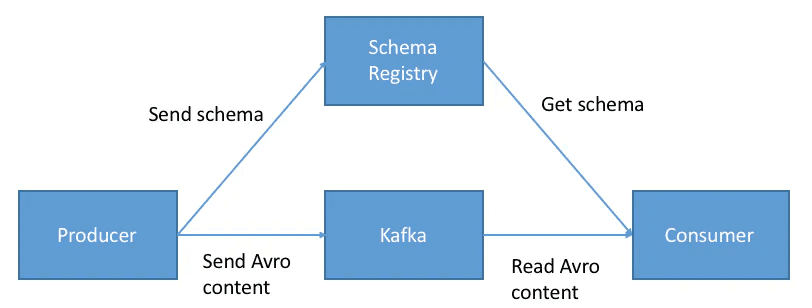
Schema Registry in Apache Kafka
Figure 6: Schema Registry in Apache Kafka (1)
Before sending data, the producer contacts Schema Registry to check if the schema exists. If not, it registers and caches the schema. The producer then serializes data with the schema and sends it to Kafka in binary format, prepended with a unique schema ID.
When the consumer processes a message, it uses the schema ID to fetch the schema from the Registry and deserialize the data. If there is a schema mismatch, Schema Registry throws an error telling the producer it violated the schema agreement.
Why Schema Registry is Non-Negotiable
Schema Registry provides automated data verification, schema evolution, and protection against breaking downstream consumers. This is basic data governance for Kafka.
As your Kafka usage grows and teams change, Schema Registry ensures:
- Data verification at the boundary
- Schema evolution without breaking consumers
- New consumers can start reading without coordination
What Happens Without Schema Registry
Your team runs Kafka for an online retail company, using JSON and Avro formats. You start with 5 people. Kafka becomes business critical and spreads to other teams. Original team members leave. New users unfamiliar with the environment join.
Someone who never spoke to the original schema author changes the JSON schema for Customer Orders by adding or removing a field.
The topic breaks. It takes half a day to figure out why. You have to find where the schema was originally defined, change compatibility settings, and update the schema manually.
Schema Registry prevents this.
Summary
Kafka uses Zero Copy and serialization/deserialization for efficient data transfer. The tradeoff: Kafka does not know what data it transfers.
Schema Registry adds data verification and versioning for producers and consumers. As teams and environments evolve, schemas do not break upstream or downstream.
Tutorial: Setting Up Schema Registry with Aiven Karapace
Now that you understand what Schema Registry does, here is how to set one up.
We will configure a Kafka cluster on Aiven with Karapace (their Schema Registry), then use Conduktor Platform to add a schema, update it, and verify compatibility.
Steps:
- Connect your Aiven cluster to Conduktor Platform
- Create a topic and a schema
- Produce messages using the schema
- Update the schema and check compatibility
Prerequisites
- An Aiven account with a 3-broker Kafka cluster and Karapace Schema Registry running. See Aiven getting started and Karapace docs.
- A Conduktor Platform account. Instructions here.
Step 1: Configure Your Kafka Cluster
Get connection information from your Aiven Console (Figure 7), then enter it in the Clusters tab of the Admin section on Conduktor Platform (Figure 8).
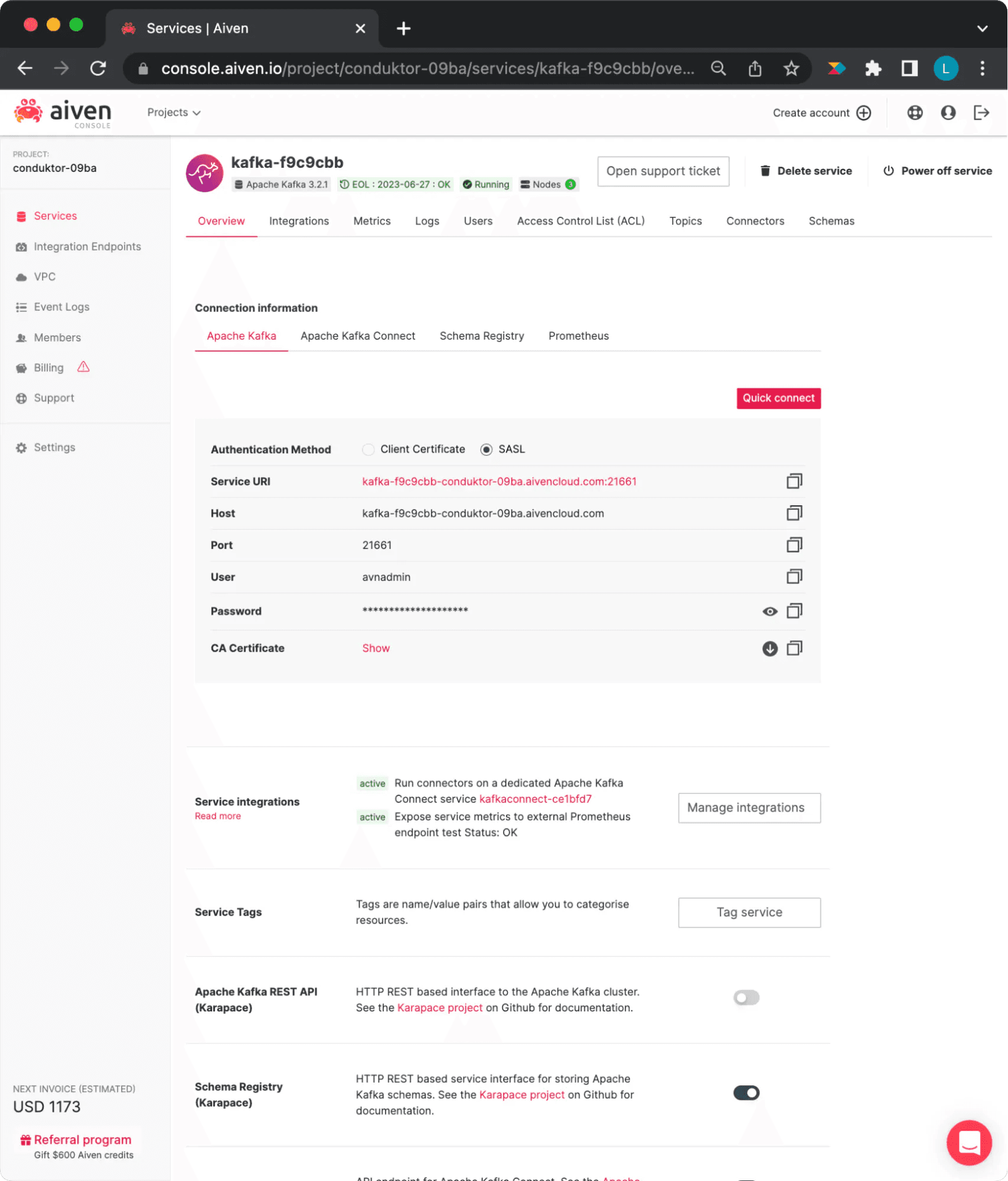
Aiven cluster configurations view
Figure 7: Aiven Cluster Configurations
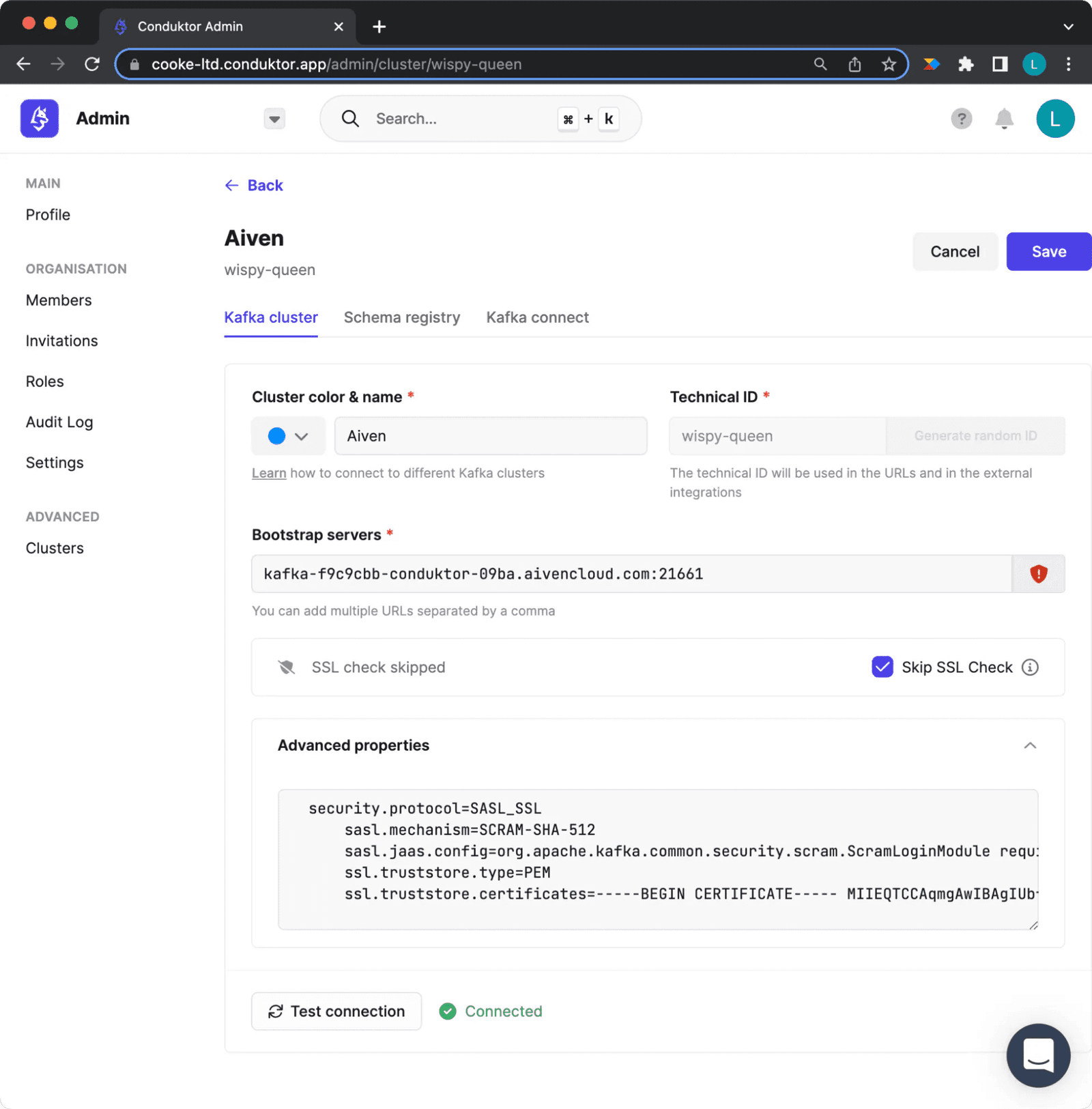
Configuring your aiven cluster in Conduktor Platform
Figure 8: Cluster Configuration on Conduktor
Enter the bootstrap server for your Aiven cluster. Add advanced settings in this format (certificate must be on one line):
security.protocol=SASL_SSL
sasl.mechanism=SCRAM-SHA-512
sasl.jaas.config=org.apache.kafka.common.security.scram.ScramLoginModule required username="" password=""
ssl.truststore.type=PEM
ssl.truststore.certificates=-----BEGIN CERTIFICATE----- -----END CERTIFICATE-----
Step 2: Create a Topic and Schema
In Conduktor Platform Console, click "Create Topic" and create a topic called "invoice-orders."
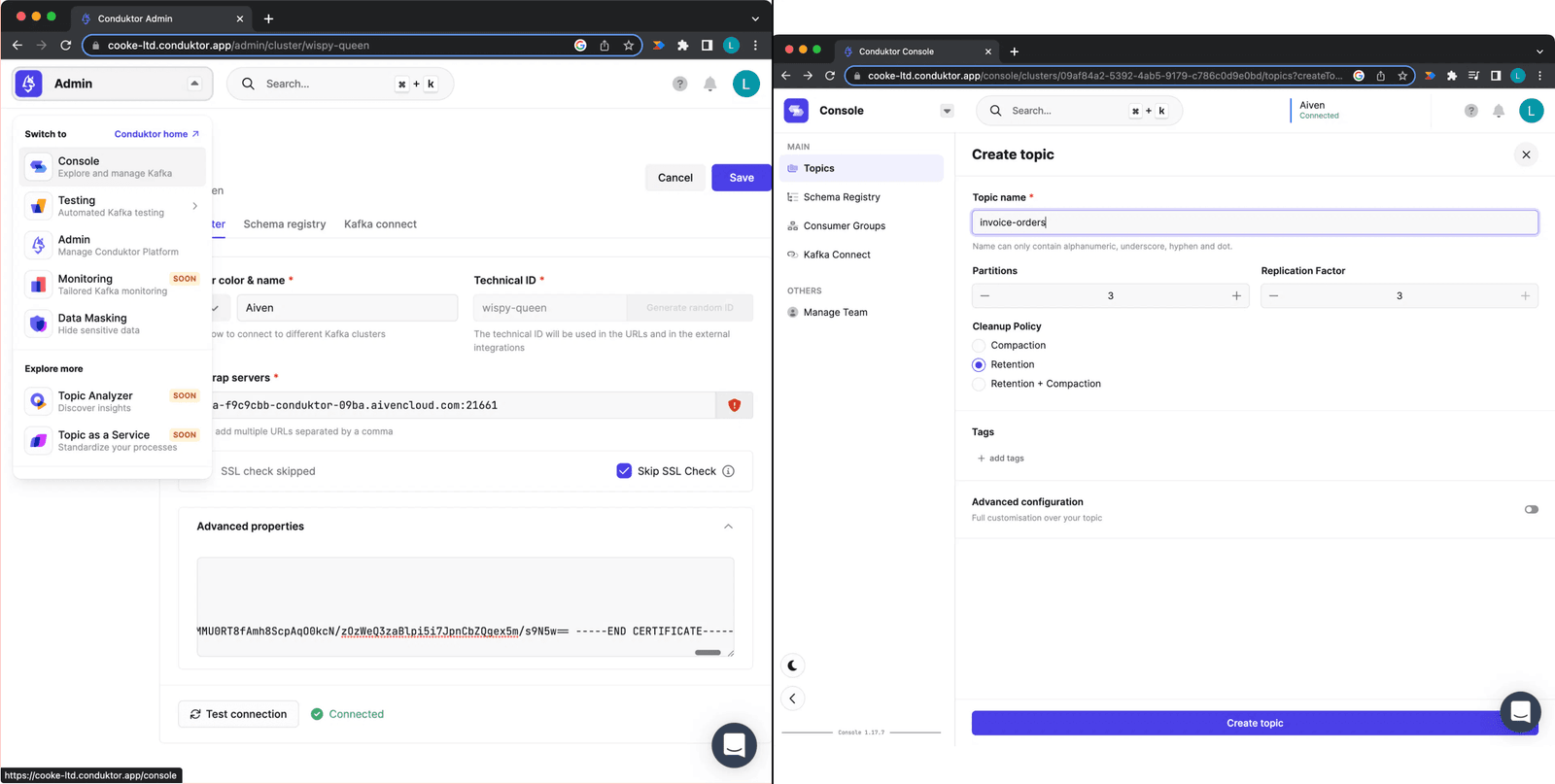
Creating a topic on Conduktor Platform
Figure 9: Creating a topic on Conduktor Platform
Navigate to the Schema Registry tab and click "Create new schema." Import this schema:
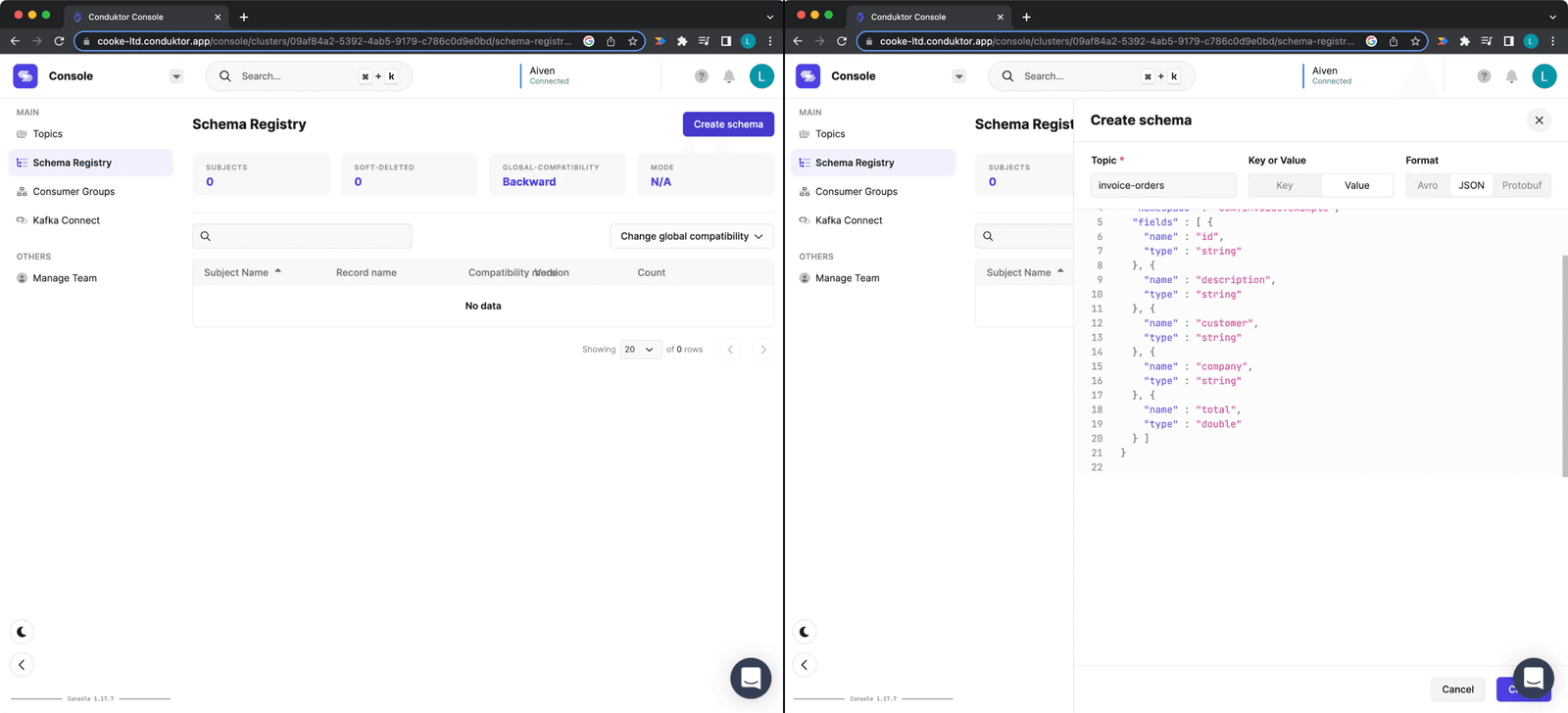
Creating a Schema on Conduktor Platform
Figure 10: Creating a schema on Conduktor Platform
{
  "type": "record",
  "name": "Invoice",
  "namespace": "com.invoice.example",
  "fields": [
    {
      "name": "id",
      "type": "string"
    },
    {
      "name": "description",
      "type": "string"
    },
    {
      "name": "customer",
      "type": "string"
    },
    {
      "name": "company",
      "type": "string"
    },
    {
      "name": "total",
      "type": "double"
    }
  ]
}
This schema defines five required fields for an invoice. A message without all fields is invalid.
Example valid message:
{
   "Invoice No.": "01072022_0982098",
   "description":  "Accommodation invoice" ,
   "customer":  "Franz Kafka" ,
   "company":  "The Castle" ,
   "total":  120.99,
}
Step 3: Produce Messages with the Schema
Conduktor Platform can produce messages that conform to your schema. Go to the "invoice-orders" topic. You can produce single messages or a continuous flow, ending after a count or time period.
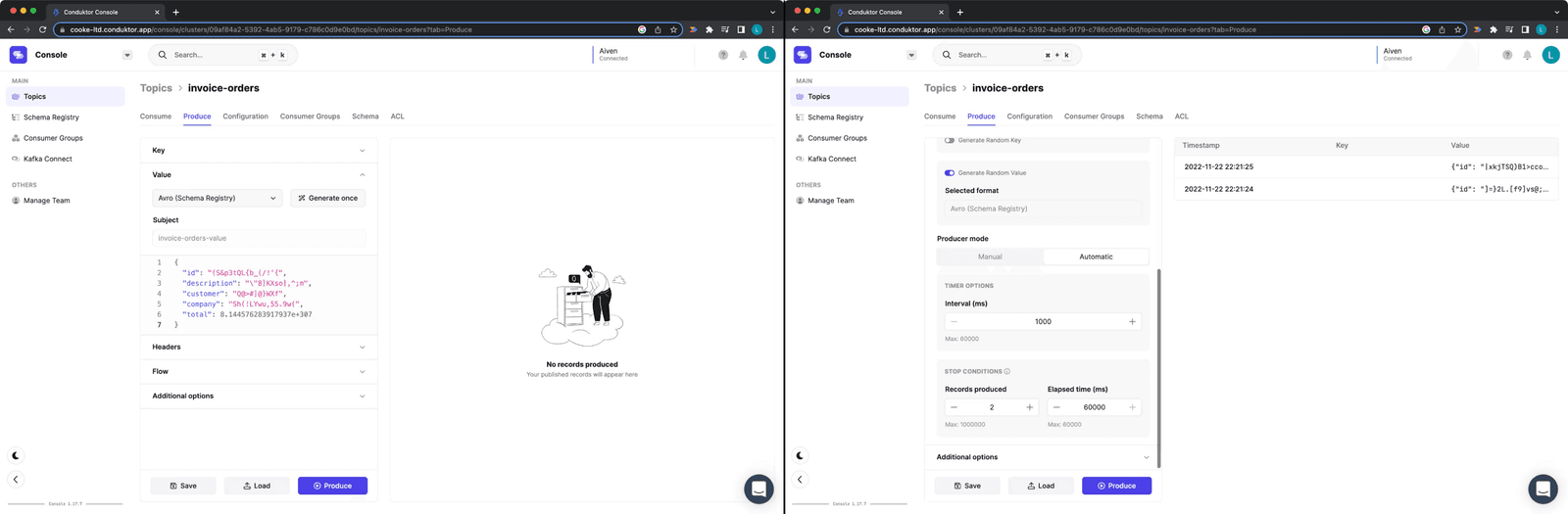
Producing messages on "invoice-orders" topic
Figure 11: Producing messages on "invoice-orders" topic
This is useful for development testing or triggering specific events.
Step 4: Update the Schema and Check Compatibility
Requirements change. Say you need to remove the "description" field because you no longer need it or do not trust its source.
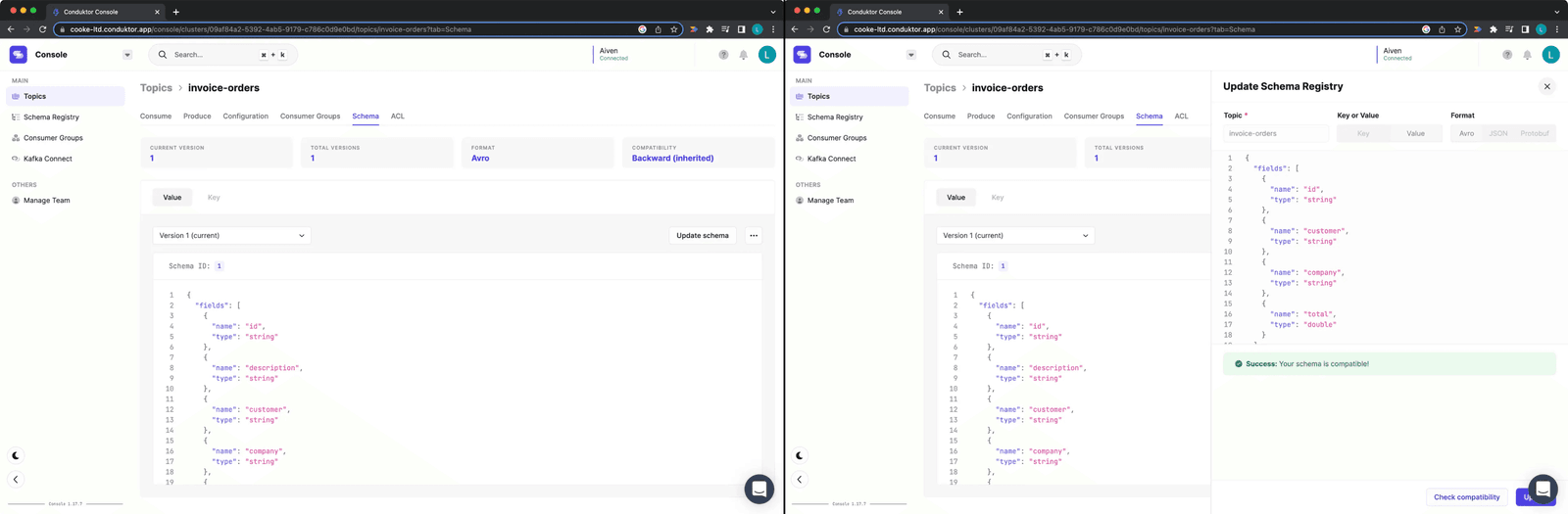
Updating Schema and checking compatibility
Figure 12: Updating Schema and checking compatibility
Click "Update Schema" and remove the field. Before saving, click "Check compatibility" to verify this change will not break upstream or downstream applications.
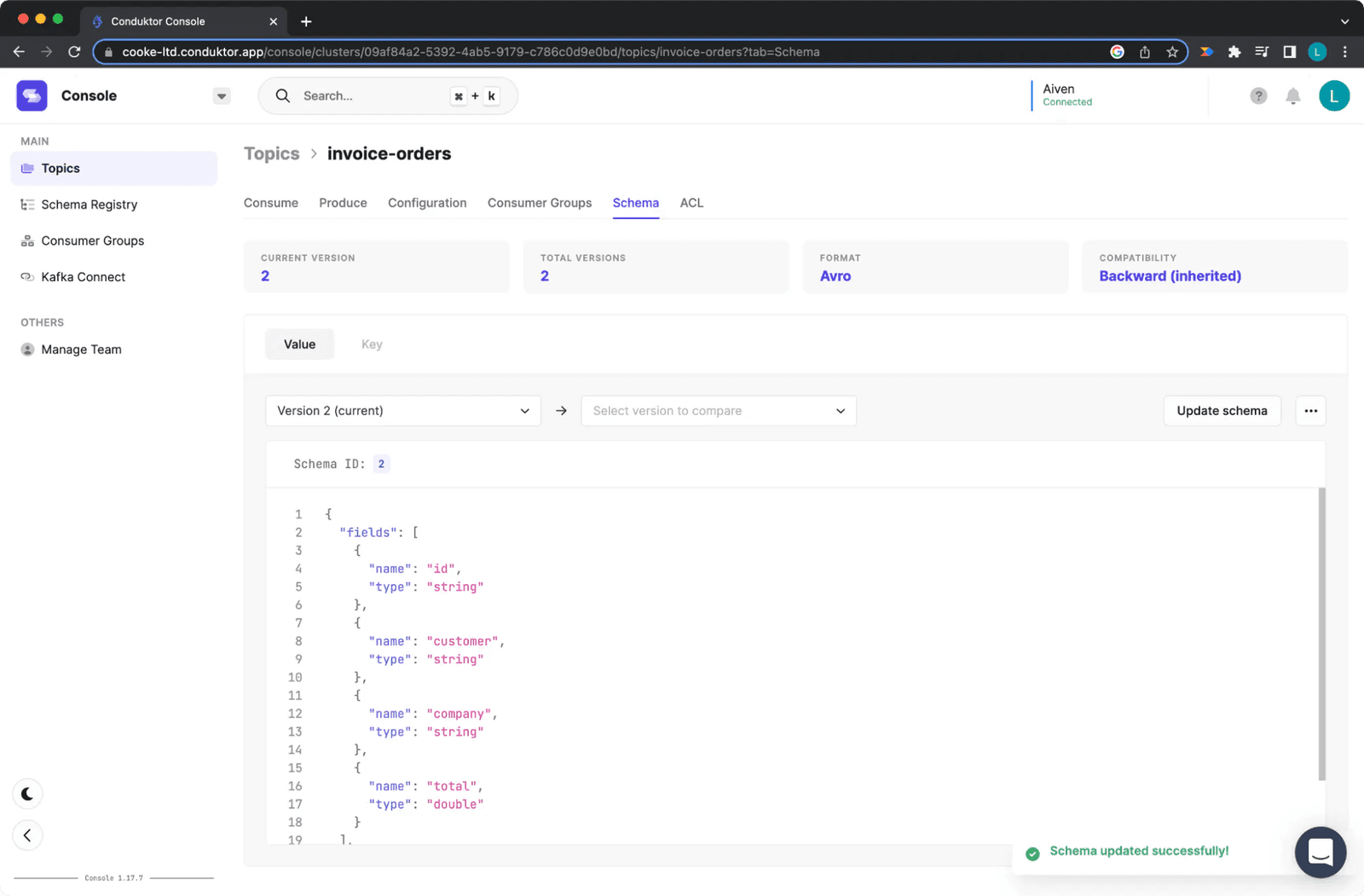
Updating the Schema once it is compatible
Figure 13: Updating the Schema once it is compatible
The compatibility check passes. The update will not cause breaking changes. Click update.
Conclusion
Schema Registry controls what producers and consumers send and receive. Each schema defines the data format for its linked topics, specifying required fields and types.
This standardizes Kafka data, ensures consistency, and enables safe evolution over time. Schemas have versions and can be updated. With Conduktor, you verify compatibility between old and new schemas before deployment.
Try Conduktor Platform here and Aiven Console here.
References
- https://www.conduktor.io/kafka/what-is-apache-kafka-part-2/
- https://developer.ibm.com/articles/j-zerocopy/
- https://developpaper.com/what-is-the-so-called-zero-copy-technology-in-kafka/
- https://www.conduktor.io/kafka/kafka-producers
- https://www.conduktor.io/kafka/kafka-consumers
- https://www.10xbanking.com/engineeringblog/bulletproofing-kafka-and-avoiding-the-poison-pill
- https://medium.com/@stephane.maarek/introduction-to-schemas-in-apache-kafka-with-the-confluent-schema-registry-3bf55e401321
- https://data-flair.training/blogs/kafka-schema-registry/
- https://medium.com/slalom-technology/introduction-to-schema-registry-in-kafka-915ccf06b902
- https://medium.com/@sunny_81705/what-makes-apache-kafka-so-fast-71b477dcbf
- https://andriymz.github.io/kafka/kafka-disk-write-performance/#
- https://livebook.manning.com/book/kafka-in-action/chapter-11/13
- https://medium.com/@sunny_81705/what-makes-apache-kafka-so-fast-71b477dcbf0
- https://aseigneurin.github.io/2018/08/02/kafka-tutorial-4-avro-and-schema-registry.html