Delta Lake Liquid Clustering: Modern Partitioning
Traditional partitioning strategies in data lakes have long presented a difficult tradeoff: optimize for current query patterns and risk poor performance as workloads evolve, or maintain multiple copies of data organized differently. Delta Lake's Liquid Clustering introduces a fundamentally different approach, adaptive, automatic clustering that continuously optimizes data layout without the brittleness of static partitioning schemes. 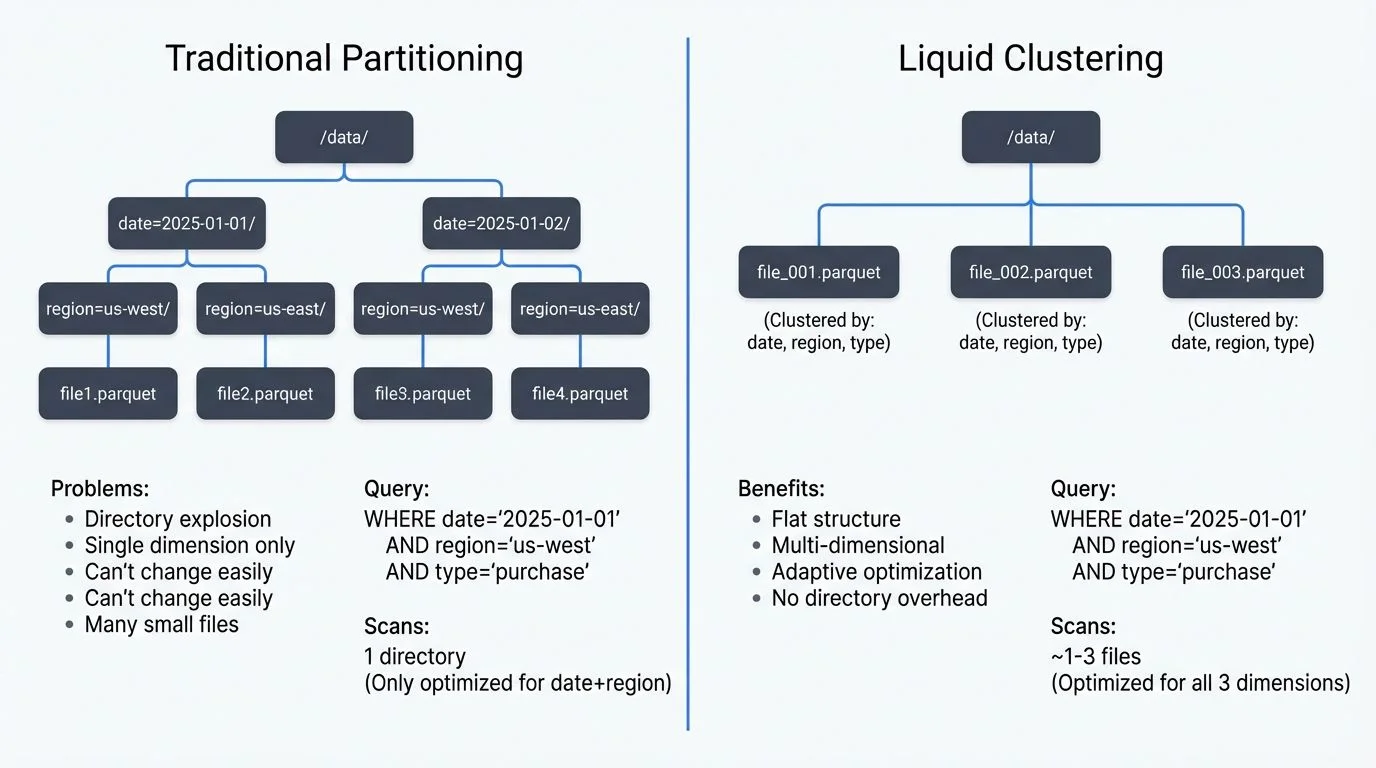
Understanding the Partitioning Problem
Traditional Hive-style partitioning creates physical directory structures based on column values. While this approach provides predictable query performance for filters on partition columns, it introduces several challenges:
- Physical Directory Explosion: High-cardinality columns create thousands of small files, degrading metadata operations and query planning performance. A table partitioned by
user_idwith millions of users becomes unmanageable. - Query Pattern Lock-in: Once you partition by
dateandregion, queries filtering byproduct_categorycannot benefit from data skipping. Changing partition schemes requires full table rewrites. - Maintenance Overhead: Small file problems accumulate rapidly. A streaming ingestion writing to hundreds of partitions every minute creates millions of tiny files, requiring constant OPTIMIZE operations.
- Multi-dimensional Access: Modern analytics often require slicing data across multiple dimensions simultaneously. Traditional partitioning forces you to choose which dimension to optimize, leaving other access patterns suboptimal.
Data Skipping: The Performance Foundation
Before diving into Liquid Clustering, it's essential to understand data skipping, the core mechanism that makes both partitioning and clustering performant.
Data skipping allows query engines to avoid reading files that definitely don't contain relevant data. Delta Lake maintains statistics (min/max values, null counts) for each column in each file. When you query WHERE event_timestamp > '2025-12-01', the engine checks these statistics and skips any files whose maximum timestamp is before December 2025, without opening those files at all.
Traditional partitioning achieves data skipping through directory structure (skip entire partition directories). Liquid Clustering achieves it through fine-grained statistics on clustered columns within files, enabling multi-dimensional skipping without directory proliferation.
What is Liquid Clustering?
Liquid Clustering replaces physical partitioning with flexible, multi-dimensional clustering that adapts to actual query patterns. Instead of creating directory hierarchies, Delta Lake colocates related data within files based on specified clustering columns, then continuously refines this layout as data arrives and query patterns emerge.
The key innovation is decoupling logical organization from physical storage. Your data remains in a flat file structure while Delta Lake maintains internal metadata about how data is clustered within files. This enables:
- Multi-dimensional clustering: Cluster by
date,region, andproduct_categorysimultaneously - Adaptive optimization: OPTIMIZE operations incrementally improve layout based on data distribution
- No small file proliferation: Write operations don't create per-value directories
- Flexible query patterns: All clustering columns benefit from data skipping
Implementing Liquid Clustering
Creating a Liquid Clustered Table
Liquid Clustering is enabled during table creation with the CLUSTER BY clause:
CREATE TABLE events (
  event_id STRING,
  user_id STRING,
  event_timestamp TIMESTAMP,
  event_type STRING,
  region STRING,
  properties MAP<STRING, STRING>
)
USING delta
CLUSTER BY (event_timestamp, region, event_type);
This creates a table clustered across three dimensions. Unlike partitioning, this doesn't create separate directories, instead, Delta Lake organizes data within files to colocate rows with similar values across these columns.
Choosing Clustering Columns
Select clustering columns based on common filter predicates and join keys in your queries:
- High-cardinality columns: Unlike partitioning, Liquid Clustering handles high-cardinality columns efficiently. Clustering by
user_idworks well without creating millions of directories. - Multiple filter dimensions: Include all columns frequently used in WHERE clauses. A table accessed by time ranges, geographic filters, and event types should cluster on all three.
- Ordering matters: List columns in order of filter selectivity, how much data typical filters eliminate. More selective columns (like timestamp ranges that filter out 90%+ of data) should typically come first, followed by medium-cardinality columns (region might filter 70-80%), then categorical columns (event_type might filter 50%). This ordering maximizes data skipping efficiency by pruning files more aggressively on the first clustering column.
Write and Optimize Operations
Data written to liquid clustered tables is automatically organized, but incremental optimization improves layout quality:
-- Standard write operations work unchanged
INSERT INTO events
SELECT * FROM raw_events
WHERE event_date = CURRENT_DATE();

-- Incremental optimization refines clustering
OPTIMIZE events;

-- Full optimization for major layout improvements
OPTIMIZE events FULL;
The OPTIMIZE command incrementally reorders data within files to improve clustering quality. Unlike traditional partition optimization, this operation is incremental, it processes only files that would benefit from reorganization.
Migration from Partitioned Tables
Migrating from traditional partitioning to Liquid Clustering requires careful planning to avoid query downtime:
Strategy 1: In-Place Conversion
For smaller tables or during maintenance windows:
-- Remove existing partitioning
ALTER TABLE events SET TBLPROPERTIES (
  'delta.enableDeletionVectors' = 'TRUE'
);

-- Enable liquid clustering
ALTER TABLE events CLUSTER BY (event_timestamp, region, event_type);

-- Optimize to apply clustering
OPTIMIZE events FULL;
This approach rewrites the entire table, which may be expensive for large datasets.
Strategy 2: Parallel Table Migration
For production systems requiring zero downtime:
-- Create new clustered table
CREATE TABLE events_clustered
USING delta
CLUSTER BY (event_timestamp, region, event_type)
AS SELECT * FROM events;

-- Switch application queries via view
CREATE OR REPLACE VIEW events AS
SELECT * FROM events_clustered;

-- Backfill historical data incrementally
INSERT INTO events_clustered
SELECT * FROM events_partitioned
WHERE event_date BETWEEN '2024-01-01' AND '2024-01-31';
This pattern enables gradual migration with fallback capability.
Validation and Performance Testing
Before full migration, validate query performance improvements:
-- Compare query performance
EXPLAIN COST
SELECT COUNT(*)
FROM events
WHERE event_timestamp > '2024-12-01'
  AND region = 'us-west-2'
  AND event_type = 'purchase';

-- Check clustering statistics
DESCRIBE DETAIL events;
Monitor data skipping metrics to confirm that clustering improves file pruning for common query patterns.
Streaming Ecosystem Integration
Liquid Clustering integrates seamlessly with streaming architectures, addressing common challenges in real-time data processing:
Structured Streaming Integration
Spark Structured Streaming writes to liquid clustered tables work identically to standard Delta tables:
# Streaming write to clustered table (PySpark)
from pyspark.sql.functions import from_json, col
from pyspark.sql.types import StructType, StructField, StringType, TimestampType

event_schema = StructType([
    StructField("event_id", StringType()),
    StructField("user_id", StringType()),
    StructField("event_timestamp", TimestampType()),
    StructField("event_type", StringType()),
    StructField("region", StringType())
])

(spark.readStream
  .format("kafka")
  .option("kafka.bootstrap.servers", "localhost:9092")
  .option("subscribe", "events")
  .load()
  .select(from_json(col("value").cast("string"), event_schema).alias("data"))
  .select("data.*")
  .writeStream
  .format("delta")
  .option("checkpointLocation", "/checkpoints/events")
  .trigger(processingTime="5 minutes")
  .toTable("events"))  # Already clustered by (event_timestamp, region, event_type)
The streaming job writes data continuously while Delta Lake maintains clustering quality through background optimization.
Continuous Optimization Pattern
Combine streaming writes with scheduled optimization:
# Streaming job continuously writes
# Separate optimization job runs periodically
from pyspark.sql import SparkSession

spark = SparkSession.builder.getOrCreate()

# Run every hour to maintain clustering quality
# Use SQL for reliability and compatibility
spark.sql("OPTIMIZE events")

# For more control over optimization scope:
# spark.sql("OPTIMIZE events WHERE event_timestamp >= current_date() - INTERVAL 7 DAYS")
This pattern ensures that streaming micro-batches don't degrade clustering quality over time.
Governance and Visibility with Conduktor
When managing streaming data pipelines that write to Delta Lake, governance tooling becomes critical. Conduktor provides comprehensive visibility into the entire data flow, from Kafka topics through stream processing to Delta Lake tables.
For liquid clustered tables receiving streaming data, Conduktor enables:
- Schema evolution tracking: Monitor schema changes in upstream Kafka topics that affect Delta table structure and clustering columns. Use Schema Registry management to track schema versions
- Data quality validation: Ensure clustering column values meet expected distributions before writes, catching data quality issues that would degrade clustering performance
- Pipeline lineage: Track data flow from source Kafka topics through transformations to clustered tables, understanding which topics feed which Delta tables
- Performance monitoring: Identify streaming jobs that write poorly distributed data affecting clustering quality, with alerts for anomalous data distributions
Conduktor Gateway can also test resilience scenarios, simulating Kafka broker failures or network partitions, to verify that your streaming-to-Delta pipeline maintains data integrity and clustering quality under adverse conditions.
This end-to-end visibility helps data teams maintain optimal clustering performance even as streaming sources and query patterns evolve.
Advanced Patterns and Best Practices
Time-Based Clustering with Retention
Combine Liquid Clustering with time-based retention policies:
CREATE TABLE metrics (
metric_id STRING,
TIMESTAMP TIMESTAMP,
value DOUBLE,
environment STRING,
tags MAP<STRING, STRING>
)
USING delta
CLUSTER BY (TIMESTAMP, environment)
TBLPROPERTIES (
'delta.deletedFileRetentionDuration' = 'interval 7 days'
);
-- Efficient time-based deletion with clustering
-- Clustering by timestamp ensures files are organized by time,
-- making this DELETE scan far fewer files
DELETE FROM metrics
WHERE TIMESTAMP < CURRENT_TIMESTAMP() - INTERVAL 90 DAYS;Clustering by timestamp ensures deletion operations efficiently target relevant files.
Multi-Tenant Table Design
Liquid Clustering excels in multi-tenant scenarios:
CREATE TABLE tenant_data (
  tenant_id STRING,
  created_at TIMESTAMP,
  data_type STRING,
  payload BINARY
)
USING delta
CLUSTER BY (tenant_id, created_at, data_type);
Queries filtering by tenant_id benefit from aggressive file pruning, isolating tenant data without physical partitioning overhead.
Monitoring Clustering Quality
Track clustering effectiveness through Delta table statistics:
-- View table-level clustering information
DESCRIBE DETAIL events;

-- Check clustering effectiveness via file-level statistics
-- Note: This requires accessing Delta's internal metadata
SELECT
  file_path,
  num_records,
  size_bytes / 1024 / 1024 AS size_mb
FROM delta.`/path/to/events/`.files
ORDER BY file_path;

-- Alternative: Use Databricks-specific commands if available
ANALYZE TABLE events COMPUTE STATISTICS FOR COLUMNS event_timestamp, region, event_type;

-- Review statistics
DESCRIBE EXTENDED events event_timestamp;
Well-clustered tables show:
- Tight min/max ranges per file: Each file contains a narrow range of values for clustering columns (e.g., one file contains events from 2025-12-15 10:00 to 10:15, not scattered across months)
- Consistent file sizes: Files are similarly sized (target 128MB-1GB) rather than having many small files
- High data skipping rates: Query metrics show most files are skipped for typical queries
Success Criteria: A well-clustered table typically shows 80-95% of files skipped for queries filtering on clustering columns, compared to 0-30% for unclustered tables.
2025 Features and Enhancements
Delta Lake's liquid clustering capabilities have matured significantly, with several key enhancements in Delta Lake 3.0+ and ecosystem improvements:
Unity Catalog Integration
Unity Catalog (the unified governance layer for lakehouse platforms) now provides enhanced clustering management:
-- Create clustered table with Unity Catalog governance
CREATE TABLE main.analytics.events (
  event_id STRING,
  event_timestamp TIMESTAMP,
  region STRING,
  event_type STRING
)
USING delta
CLUSTER BY (event_timestamp, region, event_type)
TBLPROPERTIES (
  'delta.enableChangeDataFeed' = 'TRUE',
  'delta.autoOptimize.optimizeWrite' = 'TRUE',
  'delta.autoOptimize.autoCompact' = 'TRUE'
);

-- Unity Catalog tracks clustering metadata and optimization history
DESCRIBE HISTORY main.analytics.events;
Unity Catalog maintains lineage information showing how clustering configuration changes impact downstream queries and dashboards.
Auto-Optimize and Auto-Compaction
Modern Delta Lake configurations include automatic optimization to reduce operational overhead:
-- Enable auto-compaction for streaming writes
ALTER TABLE events SET TBLPROPERTIES (
  'delta.autoOptimize.optimizeWrite' = 'TRUE',  -- Optimizes write file sizes
  'delta.autoOptimize.autoCompact' = 'TRUE'     -- Automatically runs compaction
);
These properties ensure that streaming micro-batches are automatically compacted without manual OPTIMIZE commands, maintaining clustering quality continuously.
Photon Engine Optimizations
The Photon vectorized query engine includes specific optimizations for liquid clustered tables:
- Vectorized statistics evaluation: Faster file pruning during query planning for clustered columns
- Adaptive scan batching: Dynamically adjusts file read batching based on clustering quality
- Cluster-aware data caching: Preferentially caches data from well-clustered files with high reuse potential
These optimizations provide 2-5x query performance improvements on clustered tables compared to earlier engines.
Cloud Storage Optimizations
Liquid clustering works seamlessly with modern cloud storage tiers:
- AWS S3 Express One Zone: Low-latency storage for frequently accessed clustered data with single-digit millisecond latencies
- Azure Premium Blob Storage: Optimized for clustered table operations with consistent low-latency access
- GCS Turbo Replication: Fast cross-region replication for globally distributed clustered tables
Clustering combined with cloud tiering enables cost optimization: frequently queried recent data in fast storage tiers, historical data in standard storage, all with consistent clustering performance.
Performance Considerations
When Liquid Clustering Excels
- Multi-dimensional query patterns: Analytics requiring filters across multiple columns simultaneously
- Evolving workloads: Query patterns that change over time as business needs shift
- High-cardinality clustering: Tables needing organization by columns with thousands of distinct values
- Streaming ingestion: Continuous writes where partition explosion creates operational burden
When Traditional Partitioning Remains Viable
- Stable, single-dimension access: Tables always queried by a single low-cardinality column (e.g., daily batch processing by date)
- Physical data isolation requirements: Compliance scenarios requiring separate storage paths per partition
- Legacy tooling compatibility: Systems expecting physical partition directory structures
Cost and Performance Tradeoffs
Liquid Clustering trades write-time organization for read-time performance:
- Write performance: Slightly slower writes due to clustering metadata maintenance (typically 5-10% overhead)
- Optimization cost: Regular OPTIMIZE operations consume compute resources (plan for hourly or daily optimization jobs)
- Query performance: Substantially improved for multi-dimensional queries through better data skipping (typical improvements: 60-90% reduction in data scanned, 3-8x faster query execution for analytical workloads)
- Storage efficiency: Reduced storage from fewer small files and better compression within clustered files (typically 15-30% storage savings compared to unoptimized tables)
Real-world example: A production events table with 500 million rows showed:
- Before clustering: 18,000 files, average query scanning 45 GB, 32-second typical query time
- After clustering: 850 files, average query scanning 8 GB, 6-second typical query time
- 82% reduction in data scanned, 81% faster queries, 25% smaller storage footprint
Summary
Delta Lake Liquid Clustering represents a fundamental advancement in data lake architecture, replacing rigid partitioning schemes with adaptive, multi-dimensional clustering. By decoupling logical organization from physical storage layout, Liquid Clustering eliminates the brittleness and operational overhead of traditional partitioning while improving query performance across diverse access patterns.
Key takeaways for data engineers:
- Flexible optimization: Cluster across multiple high-cardinality columns without directory explosion
- Adaptive performance: Data layout improves continuously through incremental optimization (enabled by auto-compaction in 2025)
- Streaming-friendly: Integrates seamlessly with real-time ingestion patterns, with Conduktor providing governance for Kafka-to-Delta pipelines
- Simplified operations: Eliminates partition maintenance, small file management, and layout redesign projects
- Unity Catalog integration: Enterprise governance with lineage tracking and clustering metadata management
- Proven performance: Typical improvements include 60-90% reduction in data scanned and 3-8x faster queries
For teams managing large-scale analytics workloads with evolving query patterns, Liquid Clustering provides a more maintainable and performant alternative to traditional partitioning strategies. The migration path from existing partitioned tables is straightforward, enabling gradual adoption with minimal risk.
As modern data architectures increasingly embrace streaming, multi-modal analytics, and self-service access patterns, adaptive clustering mechanisms like Liquid Clustering become essential infrastructure for maintaining performance without accumulating technical debt. With 2025's auto-optimization capabilities and unified governance, liquid clustering has evolved from a manual optimization technique into a production-ready, self-managing data organization strategy.
Related Concepts
- Introduction to Lakehouse Architecture - The foundational architecture that Liquid Clustering optimizes
- Optimizing Delta Tables: OPTIMIZE and Z-ORDER - Traditional optimization approaches that Liquid Clustering supersedes
- Streaming to Lakehouse Tables - How streaming writes interact with Liquid Clustering
Sources and References
- Delta Lake Liquid Clustering Documentation - Official Delta Lake documentation on Liquid Clustering features and implementation
- Databricks Liquid Clustering Guide - Comprehensive guide on Liquid Clustering architecture and best practices
- Delta Lake GitHub Repository - Open-source Delta Lake implementation and protocol specifications
- Structured Streaming with Delta Lake - Integration patterns for streaming workloads
- Delta Lake Performance Tuning - Optimization strategies for Delta Lake tables including clustering
Written by Stéphane Derosiaux · Last updated January 25, 2026