Four Ways to Test Apache Kafka Applications
Test Kafka components with Testcontainers, Streams test-utils, chaos engineering, and Conduktor Console. Ensure data quality and resilience at scale.


This post covers four methods for testing Apache Kafka architectures: CLI/GUI manual testing, Testcontainers integration testing, Kafka Streams test-utils, and chaos engineering.
Updated from the original article from May 2022.
Why Kafka Testing Matters
Event-driven architectures process massive data volumes with millisecond latency. Apache Kafka forms the messaging backbone for these systems, delivering information between services and decoupling components.
When Kafka powers real-time decision making, a robust testing framework becomes essential. Good tests maintain product quality, reduce broken contracts, and prevent production failures.
With distributed architectures and high data volumes, this is challenging even for experienced Kafka engineers.
Manual Testing with the Kafka CLI
Suppose we need to collect geospatial data from IoT devices. The first step: create a topic and validate that producing and consuming messages works.
Assuming Kafka is running (see Conduktor Kafkademy for setup instructions), create a geo_events topic with 3 partitions:
$ kafka-topics.sh --bootstrap-server localhost:9092 --topic geo_events --create --partitions 3 --replication-factor 1Produce a sample record:
$ kafka-console-producer.sh --bootstrap-server localhost:9092 --topic geo_events
> {"timestamp":"1647515491", "deviceId":"1234-e4b6-5678", "latLong":"38.8951,-77.0364"}
Consume and verify:
$ kafka-console-consumer.sh --bootstrap-server localhost:9092 --topic geo_events --from-beginning
> {"timestamp":"1647515491","deviceId":"1234-e4b6-5678", "latlong":"38.8951,-77.0364"}
This works for ad-hoc debugging but fails for continuous, automated testing. The CLI syntax is also cumbersome for basic operations.
Manual Testing with Conduktor Console
Not everyone testing Kafka is comfortable with CLI tools. Data analysts sampling messages or QA engineers new to Kafka benefit from a GUI. Even experienced developers gain productivity for everyday tasks.
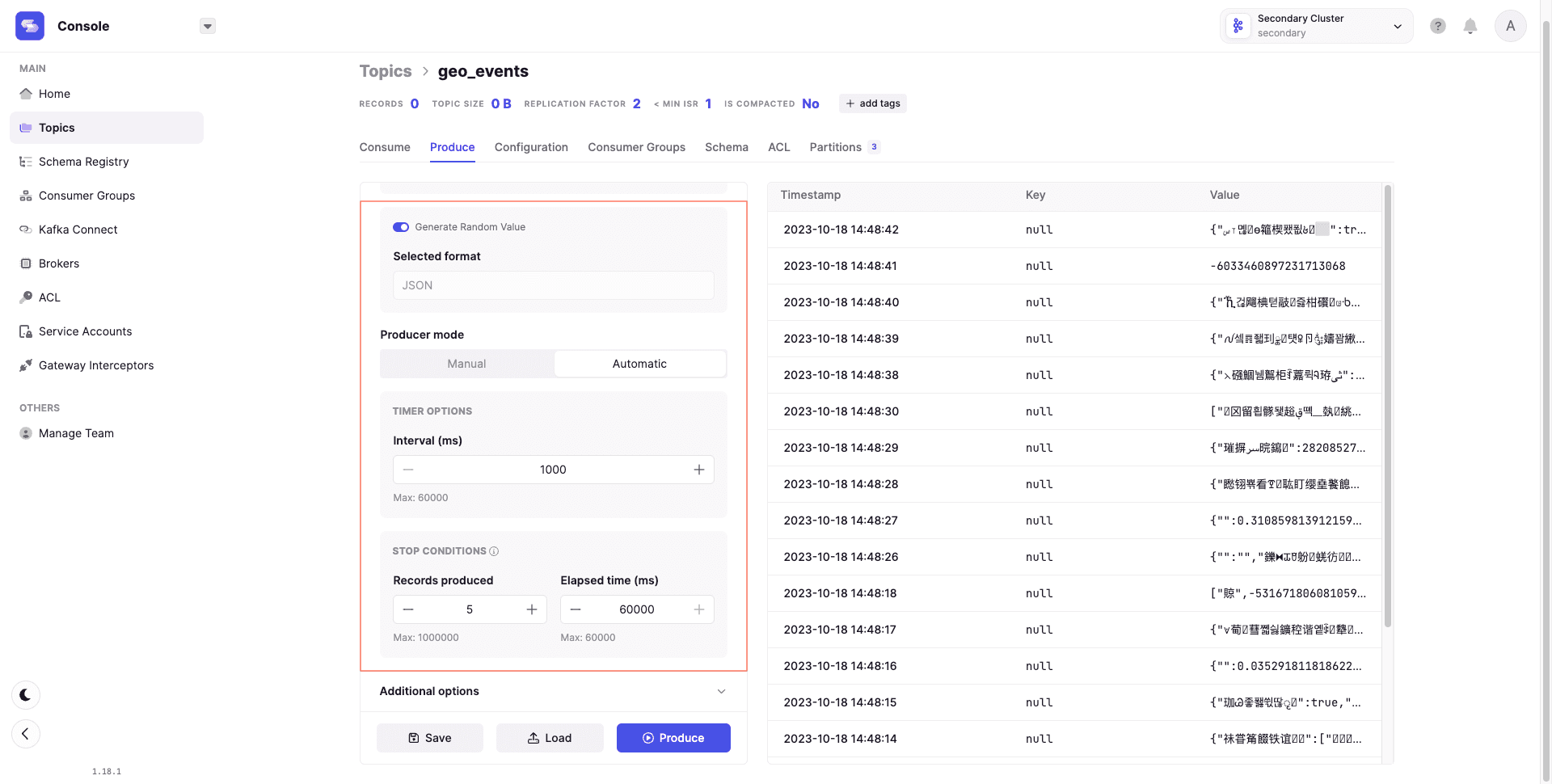
Conduktor Console supports manual testing with features like the 'Flow' mode, which produces automated event streams with interval rules and lifecycle options.
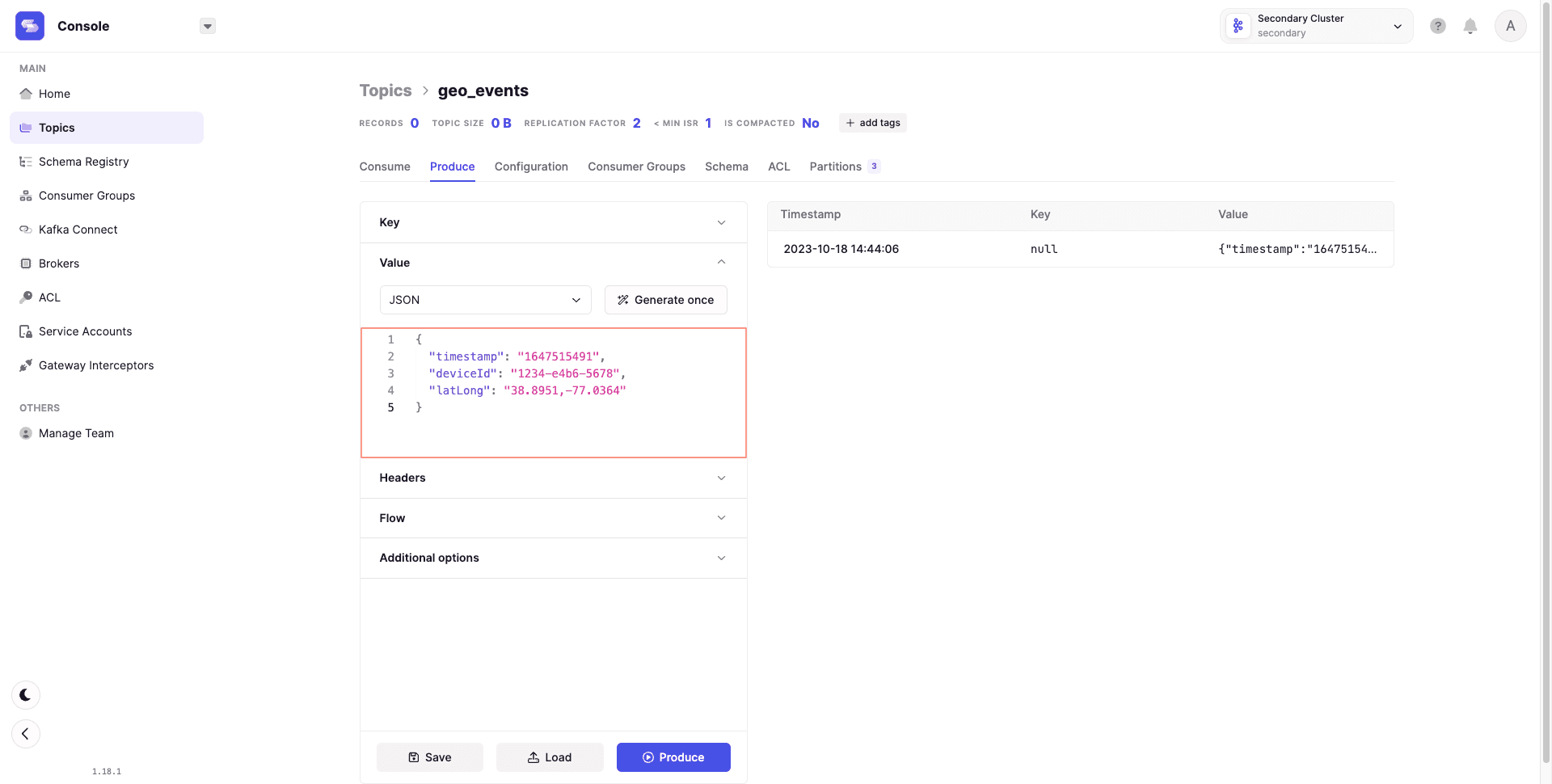
Without writing scripts, you can:
- Append headers to messages
- Produce randomized data inferred from schemas
- Configure settings like acks for safe replication
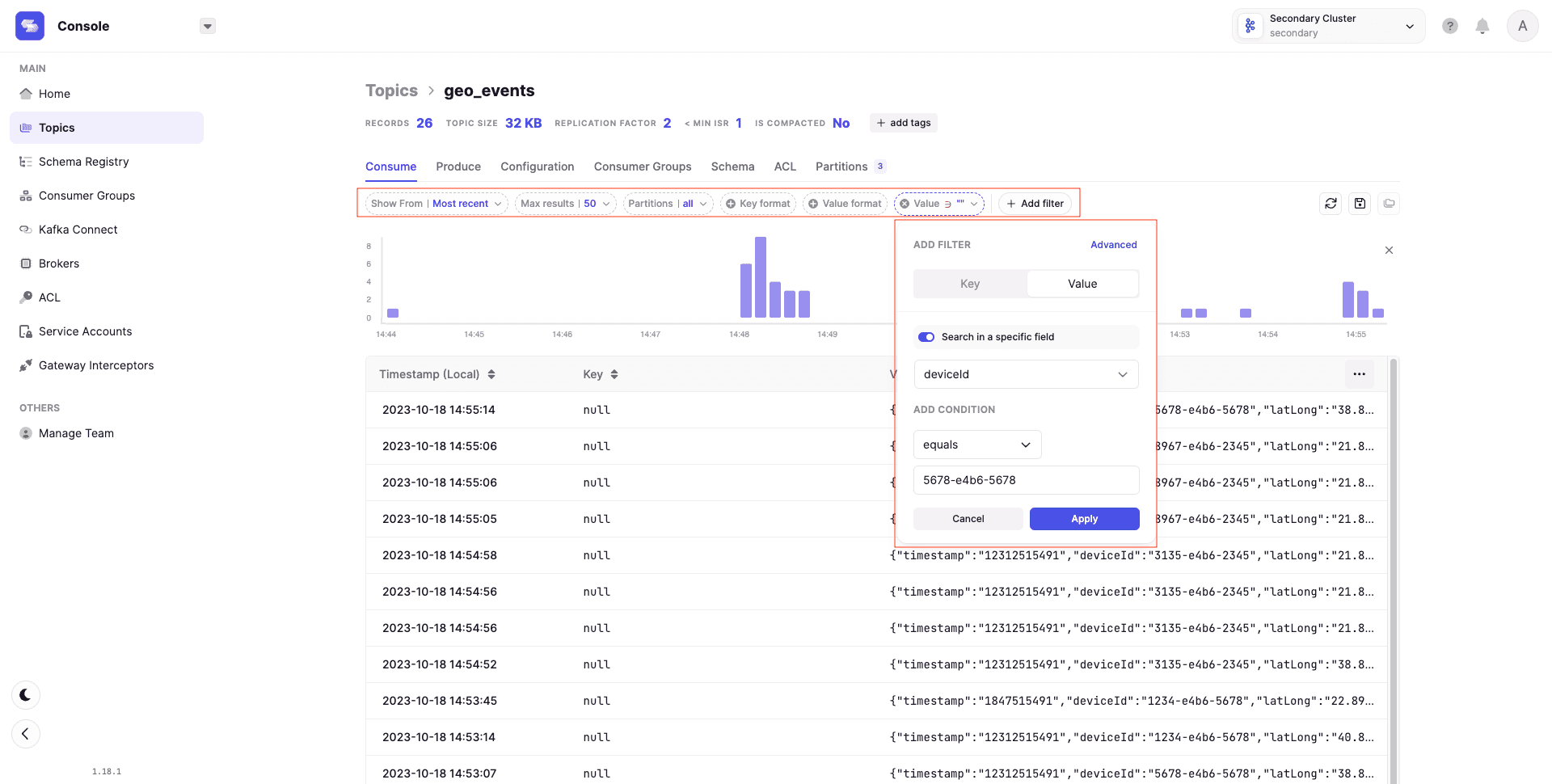
For consumption, the console provides:
- Different consumption strategies
- Record limiting
- Message filtering by criteria
Topic data displays in a readable table with record metadata.
Manual testing has limits. Most organizations depend on CI/CD, requiring automated testing in the software development lifecycle.
Integration Testing with Testcontainers
Testcontainers is a Java library for spinning up disposable Kafka containers via Docker. Ports exist for Python and Go.
Integration testing requires all dependencies to be available. Testcontainers spins up a Kafka cluster for the test lifetime and disposes it when execution completes.
Instantiate a Kafka container:
DockerImageName KAFKA_TEST_IMAGE = DockerImageName.parse("confluentinc/cp-kafka:6.2.1"); KafkaContainer kafkaContainer = new KafkaContainer(KAFKA_TEST_IMAGE);
A single script can automate creating a topic, producing records, consuming them, and asserting data. Example adapted from the Testcontainers repository:
@Test public void testUsage() throws Exception { try (KafkaContainer kafka = new KafkaContainer(KAFKA_TEST_IMAGE)) { kafka.start(); testKafkaFunctionality(kafka.getBootstrapServers()); } } protected void testKafkaFunctionality (String bootstrapServers) throws Exception { testKafkaFunctionality(bootstrapServers, 1, 1); } protected void testKafkaFunctionality (String bootstrapServers, int partitions, int rf) throws Exception { try (AdminClient adminClient = AdminClient.create(ImmutableMap.of(AdminClientConfig.BOOTSTRAP_SERVERS_CONFIG, bootstrapServers)); KafkaProducer producer = new KafkaProducer (ImmutableMap.of(ProducerConfig.BOOTSTRAP_SERVERS_CONFIG, bootstrapServers, ProducerConfig.CLIENT_ID_CONFIG, UUID.randomUUID().toString()), new StringSerializer(), new StringSerializer()); KafkaConsumer consumer = new KafkaConsumer (ImmutableMap.of(ConsumerConfig.BOOTSTRAP_SERVERS_CONFIG, bootstrapServers, ConsumerConfig.GROUP_ID_CONFIG, "tc-" + UUID.randomUUID(), ConsumerConfig.AUTO_OFFSET_RESET_CONFIG, "earliest"), new StringDeserializer(), new StringDeserializer());) { String topicName = "geo_events"; String messageValue = "{\"timestamp\":\"1647515491\",\"deviceId\":\"1234-e4b6-5678\",\"latLong\":\"38.8951,-77.0364\"}"; Collection topics = singletonList(new NewTopic(topicName, partitions, (short) rf)); adminClient.createTopics(topics).all().get(30, TimeUnit.SECONDS); consumer.subscribe(singletonList(topicName)); producer.send(new ProducerRecord (topicName, null, messageValue)).get(); Unreliables.retryUntilTrue(10, TimeUnit.SECONDS, () -> { ConsumerRecords records = consumer.poll(Duration.ofMillis(100)); if (records.isEmpty()) { return false; } assertThat(records).hasSize(1).extracting(ConsumerRecord::topic, ConsumerRecord::key, ConsumerRecord::value).containsExactly(tuple(topicName, null, messageValue)); return true; }); consumer.unsubscribe(); } }
Benefits: On-demand testing environment with no maintenance. Tests become a prerequisite to deployment.
Drawbacks: Developer-oriented approach requiring deep Kafka knowledge. No UI for understanding, reporting, or test orchestration. This creates barriers for product managers, data analysts, and QA engineers who should participate in testing culture.
Unit Testing Kafka Streams with test-utils
Kafka Streams applications contain business logic: stateless operations like filtering, stateful operations like windowed aggregations. The test-utils package provides a TopologyTestDriver for testing this logic.
The test-utils package provides a TopologyTestDriver that can be used pipe data through a Topology … You can use the test driver to verify that your specified processor topology computes the correct result with the manually piped in data records - Source
The package produces messages to a mocked input topic, applies computational logic (Topology), and checks results in a mocked output topic. No embedded or external Kafka cluster required.
Example: filtering geo_events for a specific deviceId:
public static Topology filterStream() { StreamsBuilder builder = new StreamsBuilder(); KStream stream = builder.stream(INPUT_TOPIC); stream.filter((k, v) -> v.contains("1234-e4b6-5678")).to(OUTPUT_TOPIC); return builder.build(); }
Test case piping data from two different deviceIds and asserting only valid output reaches outputTopic:
@Test public void shouldFilterRecords() { topology = App.filterStream(); td = new TopologyTestDriver(topology, config); inputTopic = td.createInputTopic(App.INPUT_TOPIC, Serdes.String().serializer(), Serdes.String().serializer()); outputTopic = td.createOutputTopic(App.OUTPUT_TOPIC, Serdes.String().deserializer(), Serdes.String().deserializer()); String messageValid = "{\"timestamp\":\"1647515491\",\"deviceId\":\"1234-e4b6-5678\",\"latLong\":\"38.8951,-77.0364\"}"; String messageInvalid = "{\"timestamp\":\"1647799800\",\"deviceId\":\"9876-e1p3-6763\",\"latLong\":\"51.5072,0.1276\"}"; assertThat(outputTopic.isEmpty(), is(true)); inputTopic.pipeInput(null, messageValid); assertThat(outputTopic.readValue(), equalTo(messageValid)); assertThat(outputTopic.isEmpty(), is(true)); inputTopic.pipeInput(null, messageInvalid); assertThat(outputTopic.isEmpty(), is(true)); }
The first message contains the desired deviceId and reaches the output. The second message is filtered out.
Benefits: Lightweight, readable, synchronous processing without external dependencies.
Limitation: No real Kafka means you cannot test interactions with external applications.
Chaos Engineering for Kafka with Conduktor Gateway
Distributed systems behave unpredictably. Chaos engineering tests system stability through enforced failures.
Kafka needs this testing too:
- Brokers become unavailable or slow. How do applications react?
- Erroneous or duplicate messages arrive. What happens?
Failures cause business loss, negative publicity, and SLA breaches.
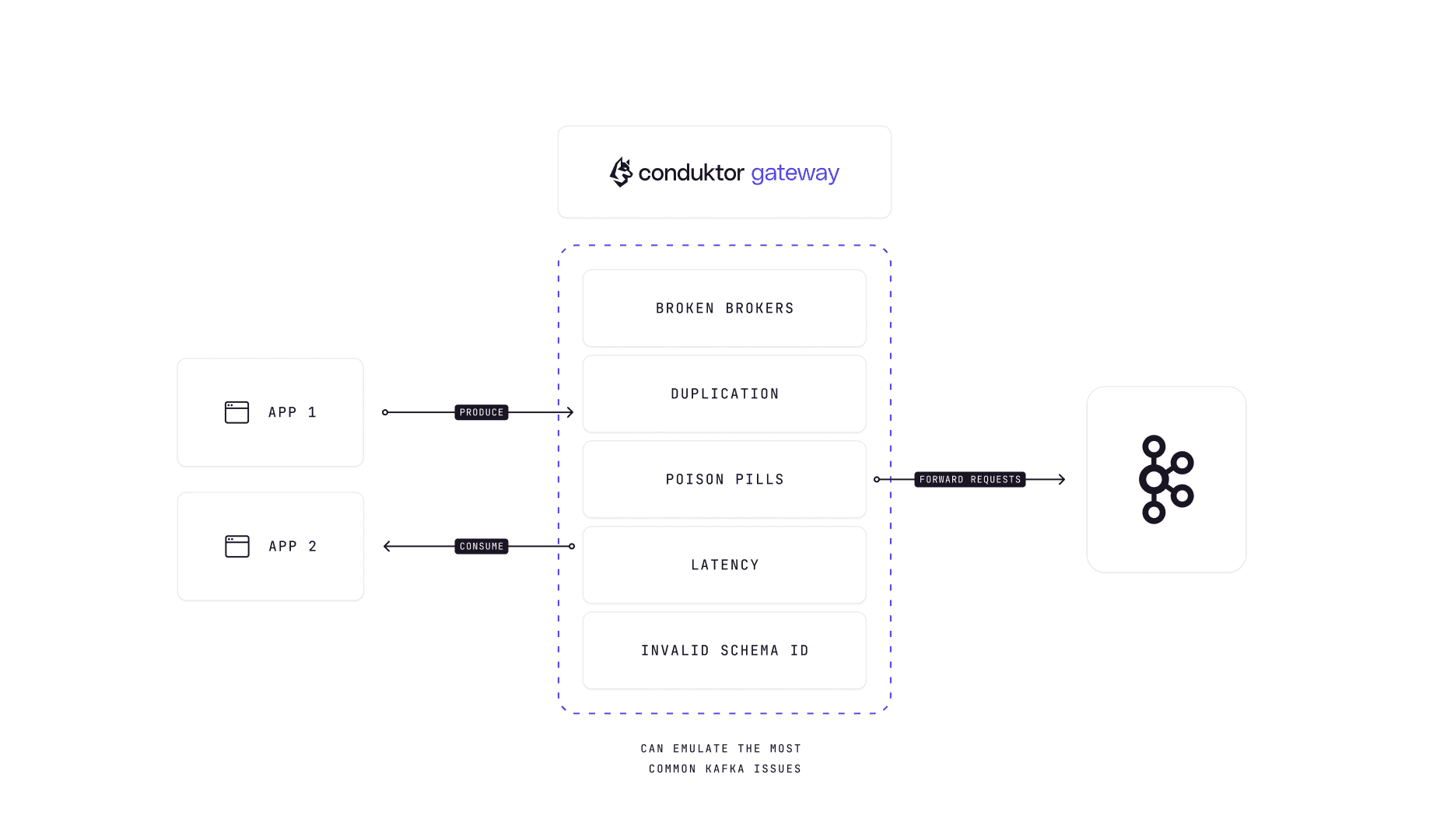
Conduktor Gateway sits between client applications and Kafka clusters, injecting chaos simulations to test application responses. Configure experiments through Console or REST APIs.
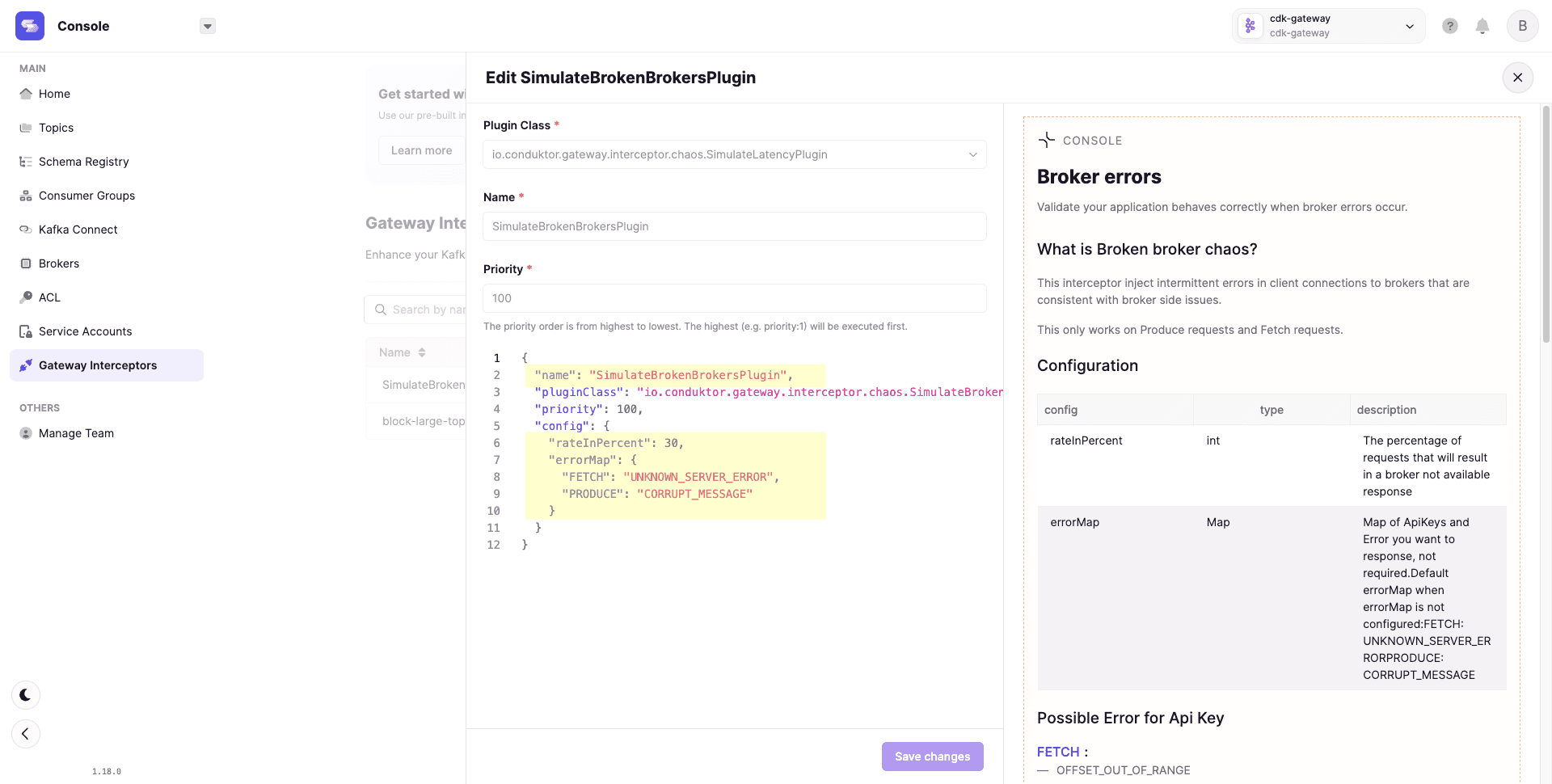
Example configuration:
- rateInPercent: Percentage of requests returning broker-not-available
- errorMap: Map of ApiKeys to error responses
{
  "config": {
    "rateInPercent": 30,
    "errorMap": {
      "FETCH": "UNKNOWN_SERVER_ERROR",
      "PRODUCE": "CORRUPT_MESSAGE"
    }
  }
}
Available chaos simulations:
- Broken brokers
- Message corruption
- Duplicate messages
- Invalid schemaId
- Leader election errors
- Slow brokers
- Slow producers and consumers
Regular chaos injection builds a culture of resilience through continuous learning.
Summary
Testing Kafka ecosystems is possible but often feels manual, fragmented, or incomplete. Each approach has tradeoffs.
Business people, QA engineers, and developers must collaborate on testing. Engineers care about working code. Product managers care about user experience. Both perspectives matter.
Conduktor Console provides a complete interface for troubleshooting, testing, and monitoring streaming applications. Combine it with Conduktor Gateway for chaos engineering.