Kafka Disaster Recovery: RTO, RPO, and Automated Failover
Kafka disaster recovery planning: RTO/RPO metrics, multi-region failover, avoiding human error, and automated switchover with Conduktor Gateway.

Failover from one Kafka instance to another is one of the most stressful operations in distributed systems. There's a lot to get right.
Apache Kafka is massively used because of its inherent resilience. With multiple brokers and built-in replication, the system handles failures gracefully. So why even consider failover strategies?
Because enterprises need Disaster Recovery Plans (DRP). A DRP ensures business continuity when massive technical problems occur. Its goal: minimize downtime, protect data, and keep critical functions running after unexpected events.
What Counts as a Disaster
Disasters are unpredictable bad things:
- Earthquakes, hurricanes, floods, wildfires
- Human accidents, industrial incidents, terrorism, hackers
- Pandemics
When your data is critical for customers or regulatory compliance, you must be prepared. Make a plan and test it. Disaster Recovery exercises are paramount. Simulate a real disaster in production ("This is not a drill") and see how your plan holds up.
Two metrics define your DRP:
- RTO (Recovery Time Objective): target time to restore operations. Example: 4 hours.
- RPO (Recovery Point Objective): acceptable data loss window. Example: 1 hour.
Netflix introduced Chaos Monkey and Chaos Gorilla to regularly break their systems on purpose, ensuring constant resilience. Conduktor offers a similar product for Apache Kafka: Chaos.
Is your Kafka a critical system? If yes, you need a DR plan.
AWS Regions and Availability Zones
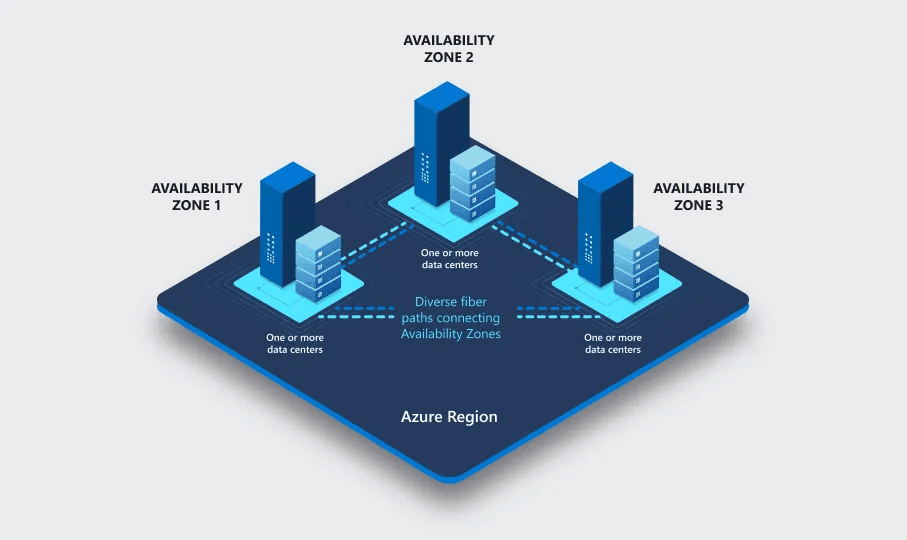
In AWS, "us-east-2" is a Region (US East (N. Virginia)). It contains 6 independent Availability Zones.
An Availability Zone (AZ) has separate facilities with independent power, networking, and cooling. They are physically isolated to provide redundancy and fault tolerance.
AWS us-east-2a is one AZ, composed of multiple highly interconnected physical data centers.
Surviving Availability Zone Failures
You set up Kafka in us-east-2, spread across 3 AZs: us-east-2a, us-east-2b, and us-east-2c.
This is the correct production setup. You're safe.
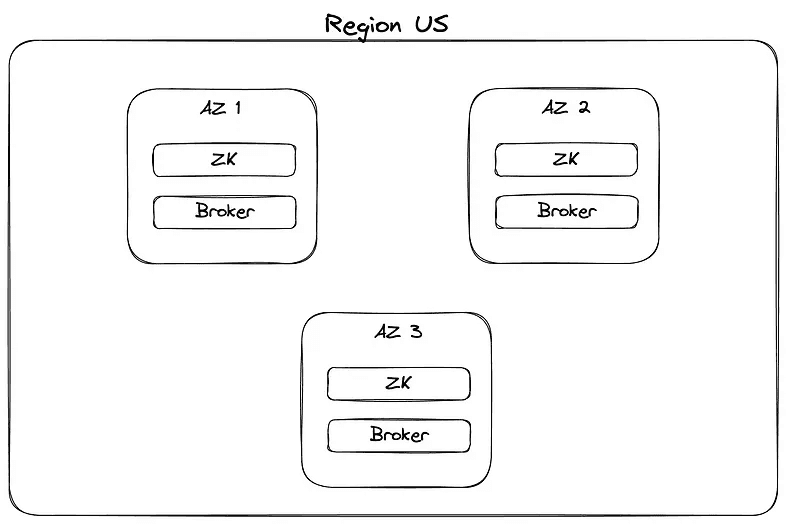
When one AZ goes down, Kafka continues because data is replicated to the other two AZs.
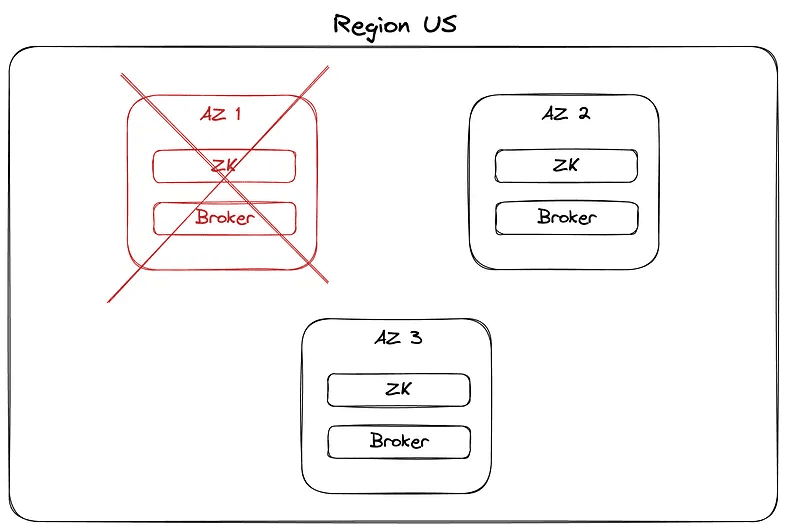
In Kafka terms, your partitions lost an ISR. If replication.factor was 3, you now have two replicas.
Good enough: data keeps flowing, nothing lost.
When an Entire Region Goes Down
A bigger disaster: the entire AWS Region hosting your primary Kafka goes offline.
If you hadn't prepared for this, it's not a disaster. It's a catastrophe.
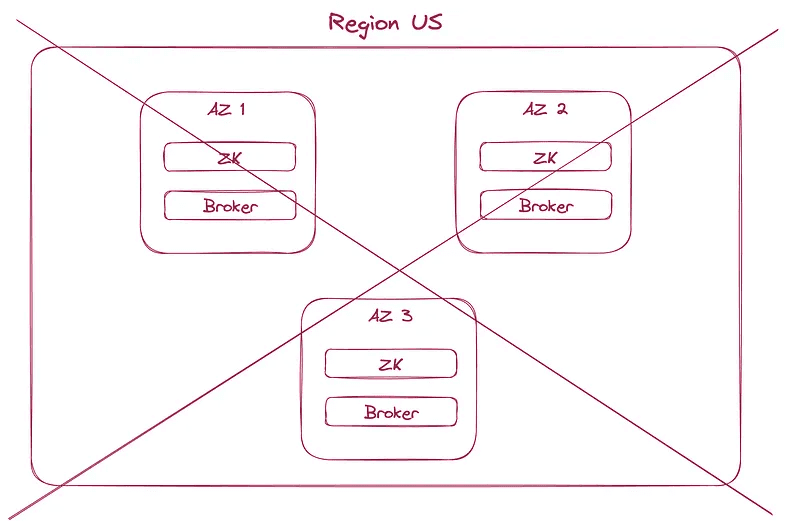
Entire regions rarely fall, but it happens. The latest at time of writing: GCP Paris, one month ago.
- https://www.theregister.com/2023/05/10/google_cloud_paris_outage_persists/: "Google Cloud's europe-west9 region took a shower on April 25. As datacenters and water don't mix, outages resulted."
Regular outages happen on both AWS and GCP:
AZ failures are more common, which is why you distribute brokers and zookeepers across multiple AZs. Region outages require more planning.
You could span your Kafka cluster across multiple regions (say us-east-1 and us-west-1). But there's a catch: it only works if you have deep pockets and don't care about latency.
- Cross-region networking costs a fortune.
Egress to a different Google Cloud zone in the same region: $0.01 per GiB. Egress outside of Google Cloud: up to $0.2 per GiB.
- Latency increases dramatically. Physical constraints apply, even in the Kafka world.
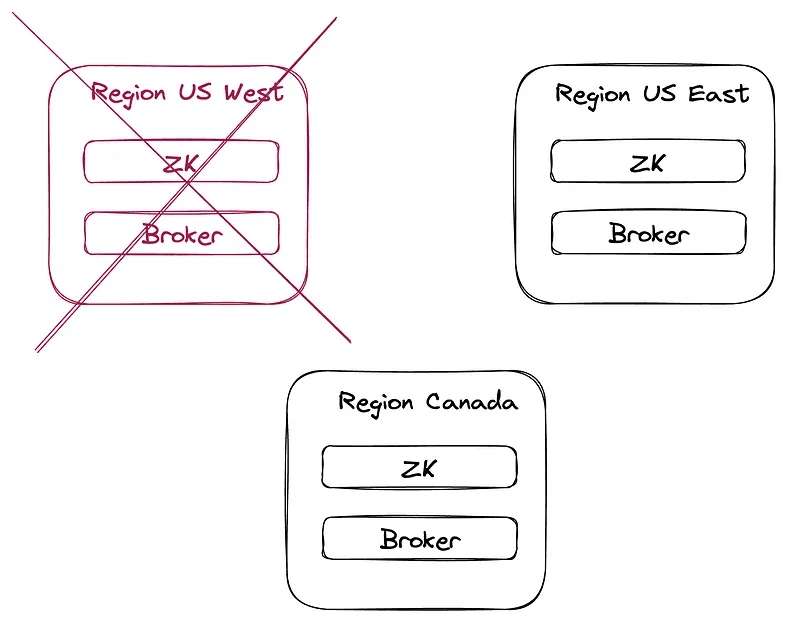
Even with cross-region replication, one factor will still wreck your DRP: humans.
Human Error is Your Biggest Risk
Your DRP may cover technical worst-case scenarios: network partitions, bugs during Kafka upgrades.
But experience shows that insiders cause disasters through malicious or accidental data loss. "Deleting production database" is a real thing.
Developers have deleted entire AZs by mistake:
$ terraform apply -auto-approve
deleting eu-production-db …
done

Ctrl^C
# Too late! Call 911!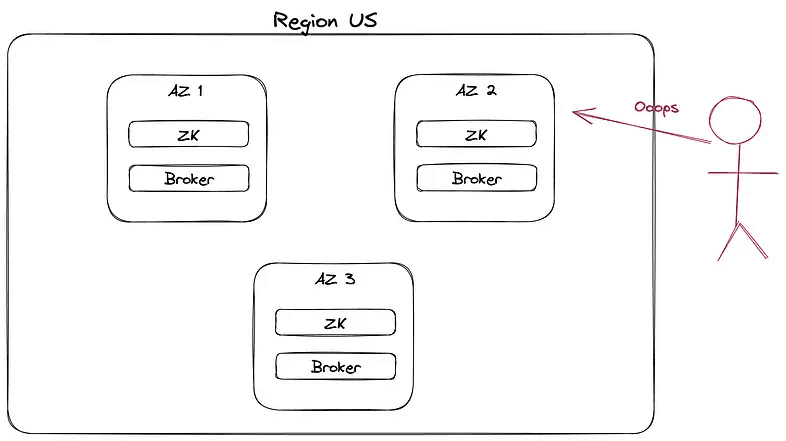
Confluent operates everything by software, not humans. https://www.confluent.io/blog/cloud-native-data-streaming-kafka-engine/#automated-operations
The system must be able to automatically detect and mitigate these issues before they become an issue for our users. Hard failures are easy to detect, but it is not uncommon to have failure modes that degrade performance or produce regular errors without total failure.
Failover Requires Massive Investment
Every business needs failover and hot backup restoration for disasters. Implementing failover is a colossal investment.
You must duplicate all Kafka deployments, doubling total cost (infrastructure and maintenance).
You must ensure data replication between Kafka instances. This means installing Mirror Maker (or commercial tools like Replicator or Cluster Linking), adding setup and networking costs.
Beyond infrastructure, you need identical governance and security at access points:
- Compliance and regulatory requirements (GDPR, HIPAA): safeguard sensitive data regardless of location
- Authentication and authorization: manage the switch so all apps and people can still work during failover
- Network segmentation and isolation: ensure failover instances are accessible with identical networking rules
- Monitoring and auditing: failover infrastructure must follow the same rules
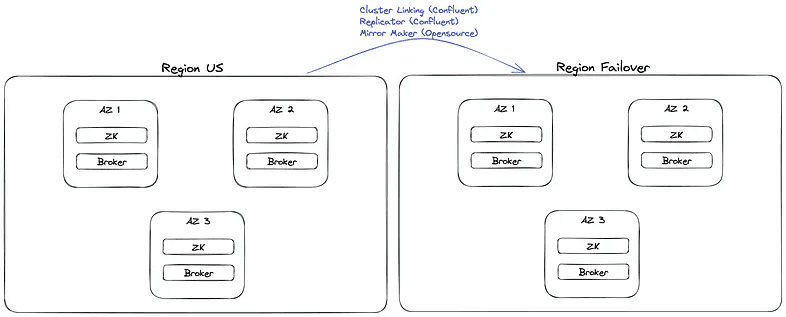
The Dreaded Moment: A Region Falls
A cloud region has fallen (say us-east-1, like yesterday). Your Kafka is inaccessible. Time for switchover.
Are you confident the transition will be smooth?
- You know your data is available in the backup cluster
- You know authorization, authentication, and networking are good
- You have approval to proceed
You send an urgent internal notice to all engineering:
Please update the bootstrap.servers to xxx:9092 for all your applications and restart them to connect to the failover Kafka cluster.
Reality is messier:
- Multiple languages
- Multiple technologies
- Kafka Connect, ksqlDB, CDC, etc.
- Where is this config? application.yaml? Terraform? Ansible? Vault?
- What are the procedures to update config? Who approves? The Tech Lead is on holiday. How do you trigger CI/CD?
- Who owns this application? The team was disbanded.
- It's Christmas. No one is around.
Before disaster hits:
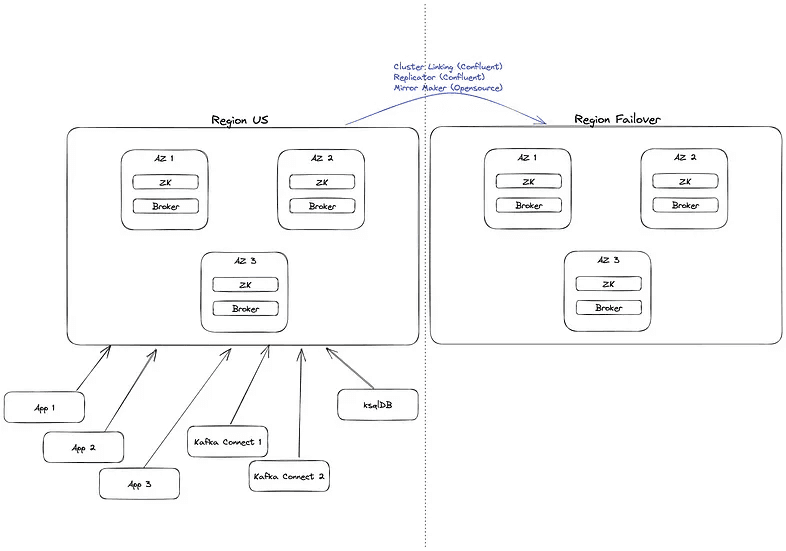
Manual update and restart of all systems:
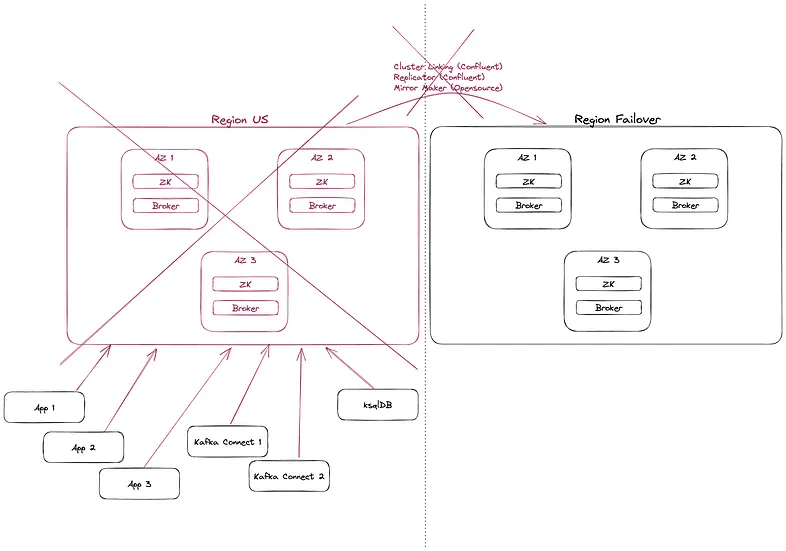
You could have invested heavily in your plan, but when it's time to execute, it falls apart and money burns.
Automated Failover Between Kafka Clusters
When it's time to fail over, never rely on humans. Rely on automation. Systems have no emotions; they won't stress during disasters.
Conduktor Gateway solves this at scale.
It sits in front of your central cluster and fallback clusters. All applications communicate with Kafka through the Gateway, seamlessly and transparently.
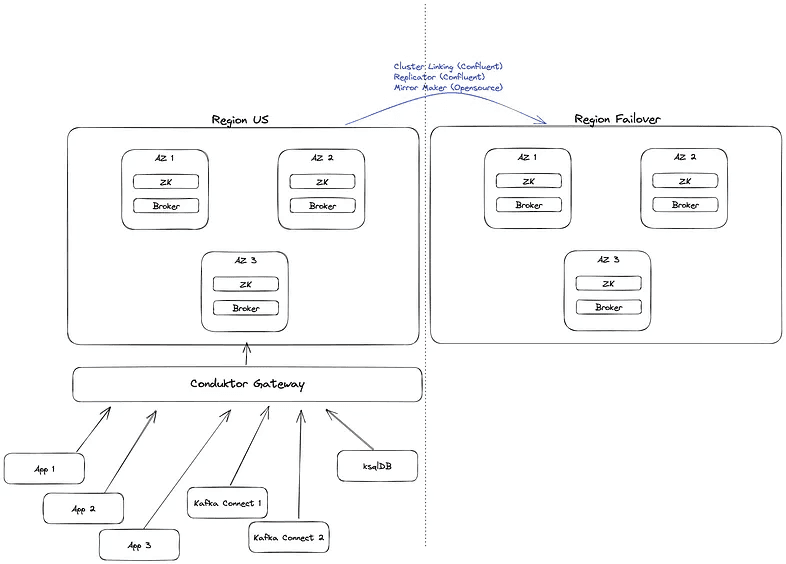
When disaster hits, the Gateway automatically detects the unavailability of the central Kafka cluster and switches traffic to your fallback clusters. It works like a load balancer, except: it's not a single point of failure (it's distributed), it speaks Kafka protocol, and it has many more features.
You can find many use cases on our blog.
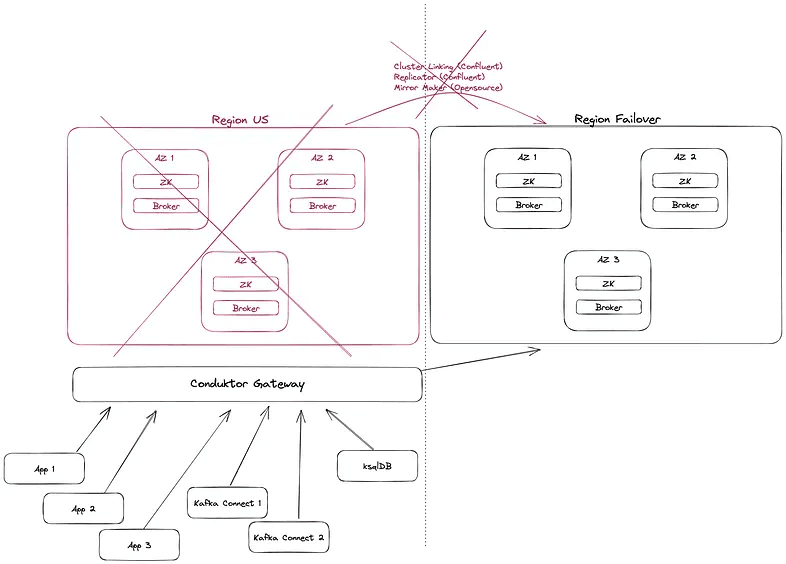
All your applications (Spring Boot, Kafka Streams, Kafka Connect, ksqlDB) now communicate with the failover cluster without interruption or configuration changes.
Nothing to do.
No stress. Business continues. It's a non-event.
When the disaster passes, switch back seamlessly. Almost no one knew what happened. This is failover automation.
Summary
Yesterday, AWS us-east-1 had a massive outage (Amazon US-East-1 region's bad day caused problems if you wanted to order Burger King or Taco Bell via their apps.) affecting many major companies.
A reminder: the cloud is incredible, but you need a solid plan B. Even on-premise, your Kafka runs on machines that can stop suddenly.
This is why Disaster Recovery Plans are critical. Many regulations require them.
DRP exercises are stressful and often barely tested or gradually forgotten. Automation should be key in failover situations. This is what Conduktor Gateway achieves.
We hope this gave you ideas for your Kafka infrastructure. Contact us to discuss your use cases. We're Kafka experts building innovative solutions for enterprises using Apache Kafka.
You can also download the open-source version of Gateway and browse our marketplace to see all supported features.